News Advisor
When reading smart books on technical analysis, you most often come across recommendations to stop trading during important news releases. Of course, as  hundreds of traders have shown, it's precisely at the moment of news release that price action becomes most unpredictable.
However, if you analyze market movements in recent years, you realize that their liquidity is weak, and all the seasoned players who remember the volatility that existed before have long since been sitting on the fence out of boredom.
Due to weak intraday movement, scalping and pipsing tactics are becoming increasingly popular, as the risk of entering into a long-term trade due to weak price movement simply does not justify it.
However, it is precisely during news releases that we can observe strong price movements, so while previously news was often ignored, now every trader waits to the second for that important price surge that all market participants can profit from.
The first news advisor found online is called EA News. Its author is a renowned programmer who volunteers to create advisors, indicators, and scripts on various Forex forums.
The expert advisor is based on a fairly simple idea: it places two pending orders at a certain distance from the price and moves them along with the price over a certain period of time. When a major news event occurs, the expert advisor simply doesn't have time to move one of the orders in the desired direction by the required distance, and the pending order becomes a market order.
The expert automatically deletes the second, failed order. Thus, a simple news advisor doesn't even consider the possible future price direction or how the market will react after the news release, but it takes the desired profit taking into account volatility.
Installing the News Advisor and its settings
The Expert Advisor itself is designed for use in the MT4 trading terminal, so it must be installed first. The installation process is straightforward: simply place the file downloaded below into the Expert folder in your MT4 data directory and update it in the Navigator panel.
Next, drag the expert advisor onto the chart of any currency pair you choose, using a one-minute or five-minute time frame (it doesn't matter, as the advisor operates on price movement). A settings window will appear, which we'll explain below:
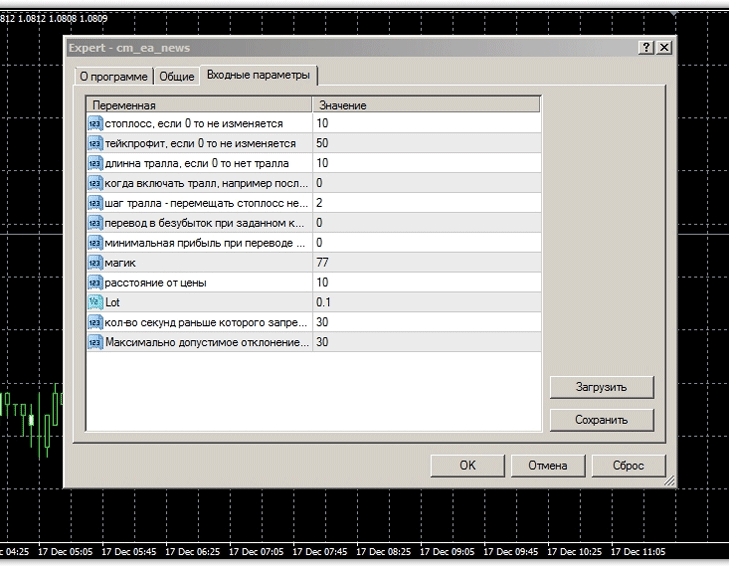 All expert advisor settings are written in Russian, but let's explore some of the subtleties. For example, if you set the stop loss to 0, then when the price moves in the pending orders placed by the expert advisor, our stop order will be static rather than dynamic. The distance from price field specifies the number of points required to place pending orders.
The "Number of seconds" field specifies the time it takes the advisor to follow the price, depending on the specified distance between the price and the order. When working with indicator-free EAs of this type, special attention should be paid to trailing. Specifically, you can specify the number of points after which the trailing stop, the trailing stop length, and its increment.
For our experiment, we decided to test the advisor for the entire year of 2014 using the strategy's author's default settings. The results are below:
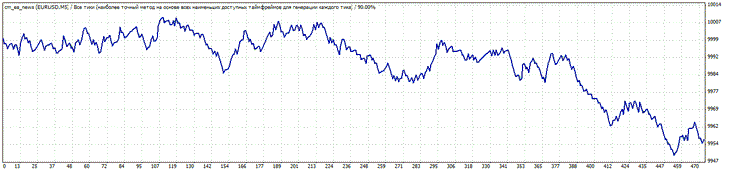
In my opinion, this is a completely expected result. The thing is, the expert's weakness is that they react to any, even the slightest, price spike, which might not even be caused by news, but by a simple, small purchase by a major player.
To fine-tune the Expert Advisor, you'll need to optimize the distance between orders, profit, stop orders, and trailing settings, and this needs to be done for each currency pair.
There's also a more effective version of this expert advisor called EA News TimeM Virtual. Unlike the first version, the author addressed the issue of sudden minimal price spikes and implemented a time limit for all traders in the settings.
However, introducing new parameters means the EA loses its autonomy, as your task becomes setting specific times during which the EA is allowed to trade. While we've lost complete autonomy, we can now precisely select the news events the EA should trade on.
This is quite complex for an inexperienced trader, so we conducted research on how the market reacts to specific news items. You can learn more about and consider some of the news items in the "Fundamental Analysis" section.
Regarding the expert's settings, all the main parameters remain the same; the only thing that has been added is the Time Start and Time End parameters, in which you can set the time at which the expert can begin working and when orders will no longer be opened.
In conclusion, I'd like to add that any news advisor requires careful optimization and strict monitoring. Remember, no robot can replace the human brain, so I recommend using the second version of the advisor and carefully selecting news that actually drives strong price movements.

