Profit Pacman Advisor
The Profit Pacman Expert Advisor is a new development from Russian traders and programmers, launched in mid-2016. Currently, Profit Pacman is undergoing active testing and optimization, as well as collecting feedback to improve its functionality and performance.

Profit Pacman is based on the beloved martingale strategy, which allows the expert advisor to quickly recover from virtually any drawdown. Profit Pacman operates on a simple trend-following indicator trading strategy and is designed for trading on hourly charts.
Since Profit Pacman is an indicator-based robot, the choice of currency pair on Forex is left to the trader's discretion, but preference should be given to key pairs with a small spread.
Installation:
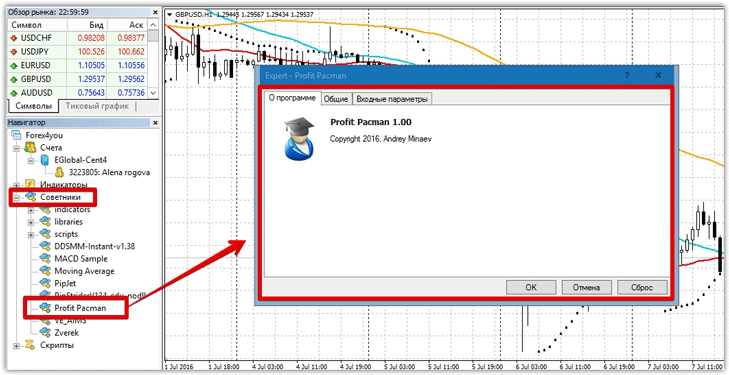
Before reviewing the settings and performing a preliminary test in the strategy tester, you will need to install Profit Pacman in MT4. To do this, scroll to the end of the article and download the archive containing the expert advisor.
Next, navigate to the trading terminal's data directory, which you can access by going to the MT4 file menu.
Strategy and Settings:
The Profit Pacman expert advisor is based on a simple indicator trading strategy based on two moving averages. The advisor will open a buy position when the fast moving average crosses the slow moving average from below, and a sell position when the fast moving average crosses the slow moving average from above. Instead of a stop order, the expert advisor uses a martingale system. It
's worth noting that Profit Pacman opens a new order when a new signal appears, without closing the existing one, and the martingale system is used independently for both buy and sell orders.
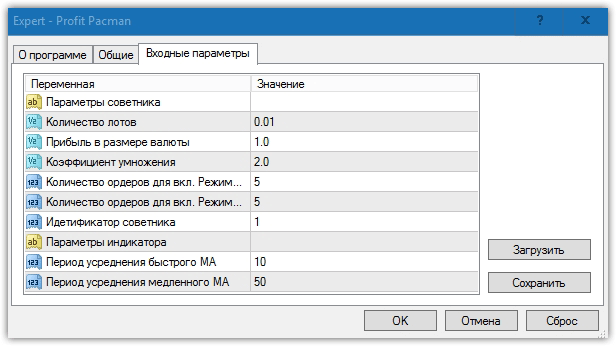
In the "Number of Lots" field, you can specify the lot size with which the EA will open the first position, for both buys and sells. The "Profit in Currency Amount" field controls the EA's profit.
The "Multiplication Factor" settings field allows you to change the multiplication factor for each new order, should the price move against you. In the "Number of Orders for Enabled Mode 1 or 2" fields, you can set the number of martingale orders for both buys and sells. The "EA ID" field allows you to enter a special numerical value by which Profit Pacman will monitor only its own orders.
The "Fast MA Averaging Period" and "Slow MA Averaging Period" fields are used to optimize the periods of two moving averages, the intersection of which determines the trade direction.
's
effectiveness, we decided to test it in the strategy tester on an hourly Forex chart for the entire year of 2015. The default settings were used, and the test was conducted on the GBP/USD currency pair. The test results are below:
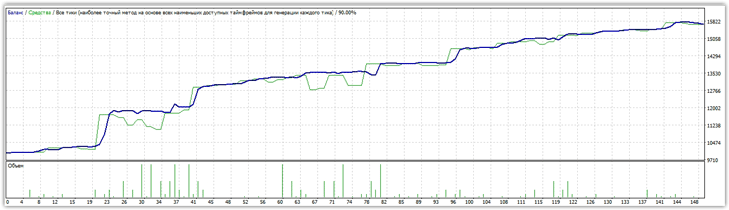
Preliminary testing yielded very positive results. Profit Pacman increased its capital by 50 percent over a year of testing, with drawdowns consistently staying within 10 percent, which is extremely rare with martingale-based EAs.
Based on order statistics, the EA never opened more than three losing trades in a row when it closed a winning streak of five. Surprised by the statistics, we decided to test the EA under the same conditions, but on the EUR/USD currency pair. The results:
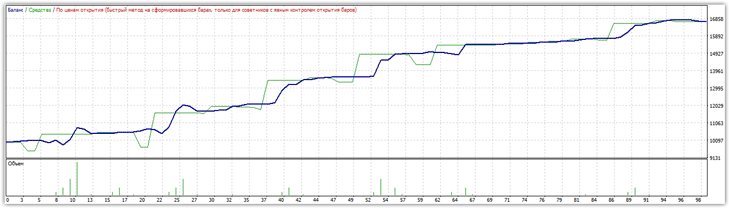
In the second test, the expert advisor was able to achieve a gain of up to 68 percent, despite a drawdown of no more than 23 percent. Overall, the expert advisor confidently passed the two test scenarios we prepared for it, delivering very impressive results. It's worth noting that martingale-based experts are extremely risky, but we can confidently recommend this example for trading on a cent account.
Download Profit Pacman

