Red Warrior Advisor
A professional approach to trading requires market participants to constantly adapt to sudden changes in the market situation.

The constant volatility and cyclicality of the markets means that the same trading strategy cannot consistently generate profit over a long period of time.
Therefore, every professional has two or more different trading tactics at their disposal, which allows them to diversify risks during unsuccessful periods of one strategy at the expense of the profits of another.
The Red Warrior advisor embodies a comprehensive approach to solving the problem of market volatility by combining two completely opposite trading strategies into a single algorithm that trade simultaneously and independently of each other.
It was this interesting solution that led to increased efficiency and a significant increase in the number of profitable transactions.
The expert advisor itself is designed for trading on the EUR/USD currency pair, but it has successfully demonstrated stable results on other currency pairs as well.
Installing the Red Warrior Expert
There are two versions of this robot available online, but we strongly recommend installing the second version of the expert, as it has fixed many of the bugs found in the first version. To install, download the archive containing the expert and place it in the Expert folder from the root directory of your terminal.
After restarting the platform, the robot will appear in the list of advisors in the "Navigator" panel. The next step is to drag Red Warrior onto a currency pair chart with a fifteen-minute time frame:
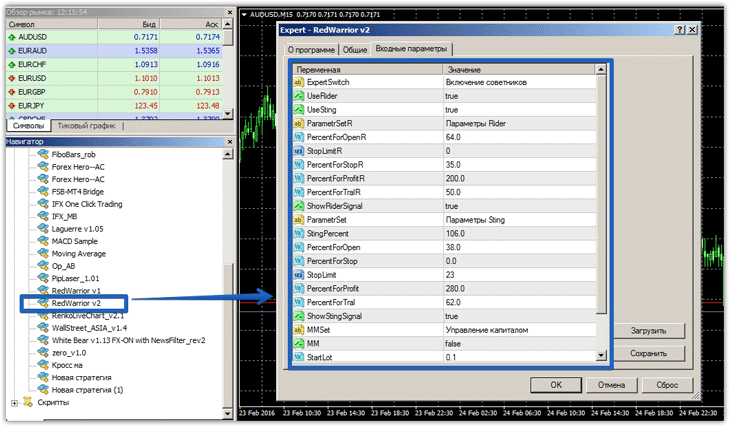
Red Warrior Settings: Testing Each Strategy Separately
As mentioned above, the Red Warrior expert advisor implements two completely opposite trading strategies: Rider and Sting. These strategies can be enabled or disabled using the UseRider and UseSting parameters in the advisor.
The Rider strategy strictly follows the trend.
For this purpose, the Bollinger Bands indicator is used; when the upper and lower boundaries of the indicator are broken, the advisor opens a trade in a certain direction.
In the Rider block settings, in the PercentForOpenR line, you can change the percentage of movement that is calculated based on the channel.
In the StopLimitR line, you can set a static stop order in points for strategy trades. You can also set a dynamic stop order based on the channel width percentage by specifying a specific percentage in the PercentForStopR line.
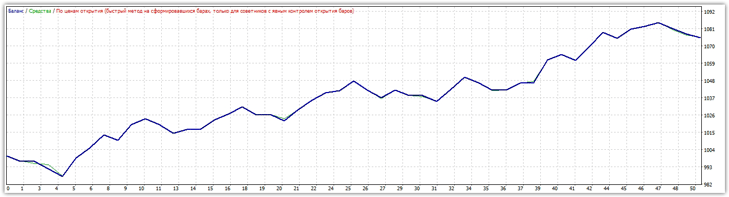
The PercentForProfitR line sets a dynamic profit using the same principle as a stop order. The results of testing the Rider strategy for 2015 on the EUR/USD currency pair can be seen in the image below:
 The Sting strategy is the complete opposite of the Rider strategy, and is based on trading within a channel on a rebound from its boundaries. The StingPercent line specifies the percentage of the candlestick's shadow that must cross the channel boundary for the EA to open a position in the opposite direction.
The PercentForOpen line specifies the price movement percentage, calculated based on the channel width. The PercentForStopR and PercentForProfitR settings perform the same functions as in the Rider block. The PercentForTralR line specifies the position trailing size as a percentage of the channel width.
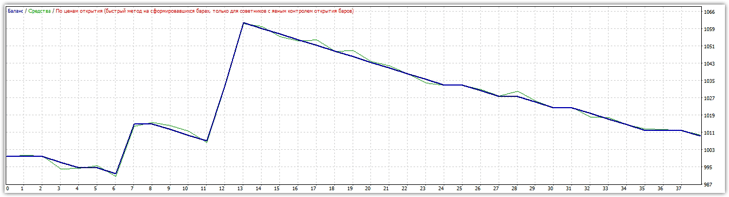
The results of testing the Sting strategy on the EUR/USD currency pair are shown in the image below:
 In addition to the strategy settings block, the advisor allows you to select money management. If you select True in the MM line, you must specify the risk percentage of your deposit per position in the RiskPercent line. If you do not enable this block, you must specify a fixed lot for both strategies in the StartLot line.
The results of testing two strategies simultaneously are shown below:
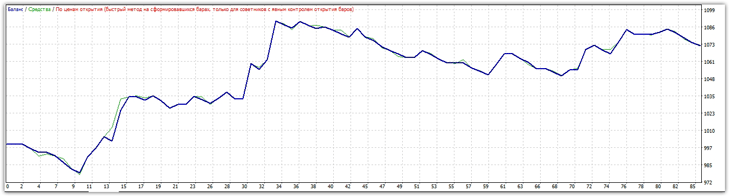 In summary, it's safe to say that Red Warrior is a professional development that has enabled hundreds of traders worldwide to earn small but stable profits. It's worth noting that, thanks to its martingale-, the EA can operate successfully with small capital.

