DayScalp Advisor
DayScalp is an old development by Russian traders, dating back to 2010. Despite its age,  many traders still actively use it, as the algorithm it employs remains relevant to this day.
It's worth noting that all new advisor developments are nothing more than clones of the forgotten old ones, while the basic algorithms remain the foundation for new modifications under a new brand. Just look at the story of the sale of the Aladdin expert advisor, which was essentially an old, forgotten, modified copy of the Integra.
The DayScalp advisor, despite its name, is a typical martingale that pyramids pending orders with doubling the lot size. The introduction of pending orders into the advisor has made it more autonomous, as in the event of a sudden internet outage, the broker will automatically open the orders previously placed by the advisor.
Installing DayScalp in MT4
To install the Expert Advisor on your trading platform, first download the Expert Advisor file at the end of this article. Then, access the MT4 root directory via your platform's file menu. Place the file in a folder named "Expert" and update the components in the "Navigator" panel. Next, select any pair you're interested in and drag the Expert Advisor onto it. A settings window will appear:
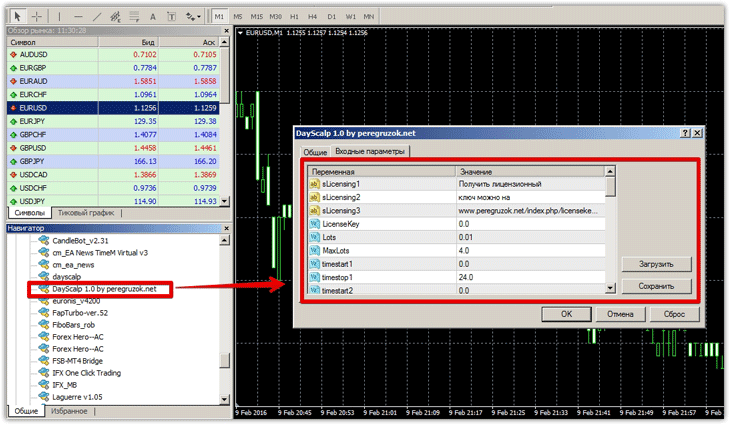
DayScalp Settings
DayScalp's developers have strived to accommodate as many possible settings as possible, greatly simplifying further optimization of the expert advisor. In the "Lots" field, you must specify the initial lot size with which the expert advisor will begin trading. It's worth noting that if the price moves against you, DayScalp will place pending orders with a doubled lot size, so it's important to set the initial lot size wisely, based on your deposit.
The MaxLots line sets the maximum final lot size. This option should be approached mathematically, and the parameter should be set so that if the EA opens its final 11th order, its profit will outweigh the losses.
If this parameter is too low, you will get a negative balance curve. The EA has a time filter, which specifies the time from which the EA is allowed to trade. To use this filter, specify the start time of trading in the timestsrt1 and timestsrt2 lines, and the end time in the timestop1 and timestop2 lines. As you can imagine, the EA will not trade between the times specified in timestsrt1 and timestsrt1.
The Profit line specifies the profit amount in points for the first order only. Stop Loss is set only for the first order. DayScalp allows you to limit risks based on your account drawdown.
To do this, click True in Closeorders and enter the drawdown percentage in the Closeprocent line. The Level2...11 lines specify the distance in points between pending orders, and the Profit2...11 lines specify the profit for each of the 11 pending orders.
History testing
Despite the fact that the settings are clearly outdated and no longer suitable for modern conditions, we decided to test the strategy tester on an hourly chart for the entire 2015 period on the EUR/USD currency pair. Test results:
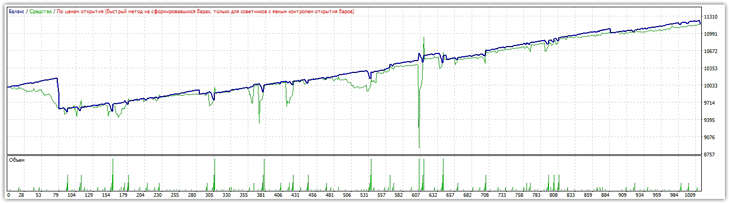 The chart shows significant drawdowns, which far exceed the profits generated. Over the course of a year, the EA returned only 13 percent, despite drawdowns reaching up to 30 percent. Testing under the same conditions on the EUR/CHF chart is shown in the image below:
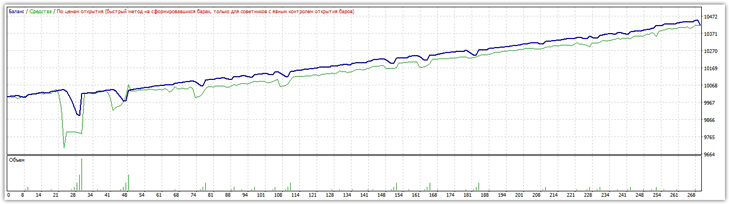 Overall, the advisor remains profitable and, unlike most robots using martingale, didn't wipe out the account in 2015. However, using DayScalp in this configuration without re-optimizing the settings is quite dangerous, as the profit achieved is an order of magnitude smaller than the drawdown that could have led to a loss.

