Advisor Hugo
There's a belief that most experts can't generate consistent profits for more than  six months. This assertion is supported by the fact that the market is volatile, and traders are becoming more inventive and cunning every day.
This statement is partly true, but fundamental principles such as whether the market is trending or flat are immutable. The only thing that changes is the length of time it remains in one state or another. While the market was previously predominantly trending, it now spends a significant amount of time in a sideways direction, breaking through consolidation with sharp trend movements.
The Hugo advisor is based on the fundamental premise that the trend is your friend. Therefore, the advisor uses a unique trend indicator created by its developers to make entry decisions.
The approach, based on immutable market rules, allows the expert advisor to remain relevant to this day. It's worth noting that the expert advisor's currency pairs are EUR/USD and GBP/USD. However, I strongly recommend testing on other currency pairs as well, as the trading strategy is multi-currency.
Time frame for trading is preferably H1.
Before you begin, you need to install the Expert Advisor on your Meta Trader 4 trading terminal. To do this, download the archive containing the Expert Advisor and indicator after reading this article. Next, launch your terminal and open the data folder in the File tab. Place the indicator in the folder labeled "indicators," and the Expert Advisor in the "expert" folder. After restarting the trading platform, find the Expert Advisor in the list of Expert Advisors and drag it onto the screen. A settings window will open, which I'll explain below:
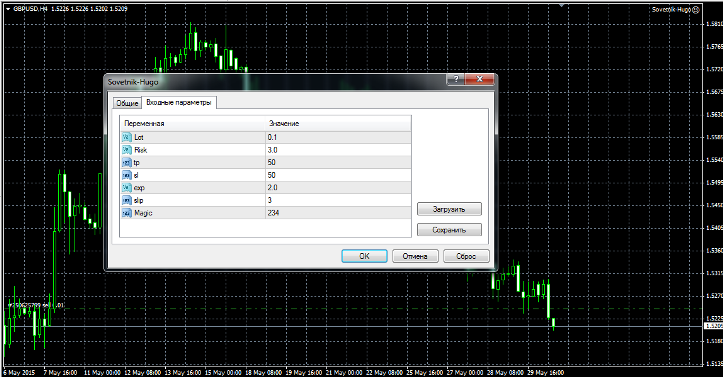
Hugo Advisor setup and features
This expert advisor uses martingale in its trading. However, it doesn't use averaging over a series of orders, but rather like roulette. If an order reaches a stop loss, the expert advisor will simply double your trading lot upon the next signal. This approach allows you to identify risks promptly and avoid overloading your account with simultaneously open orders.
In the exp line, you can change the multiplication factor for the previous lot. The default is 2, so each subsequent lot will be multiplied by 2.
The "risk" line controls the risk as a percentage of the deposit. You can control your risks by increasing or decreasing the percentage. In the "Lot" line, you can set the initial lot the EA will enter. The "tp" line controls the profit in points, and the "sl" line controls the stop order in points.
The slip function is responsible for the slippage, above which the EA will not enter a position. The magic function allows the EA to define its own orders and leave others alone.
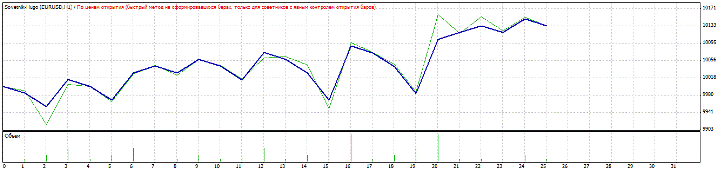
I ran the first test of the advisor on the EUR/USD currency pair on an hourly time frame. The test period was from July 30, 2014, to June 1, 2015. The test results are shown in the image below:
We're running the second test on the GBP/USD currency pair. All conditions, time frame, and period remain the same as in the previous test. The test results are shown in the image below:
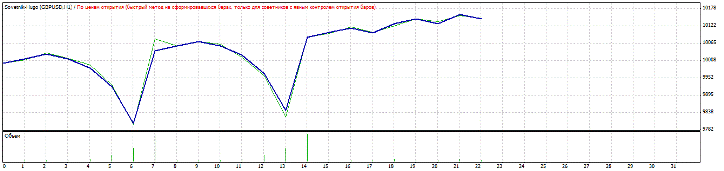
Based on tests, the advisor isn't incredibly profitable. However, in good hands, it can generate small but stable profits with acceptable risks. This advisor is also ideal for those with small deposits, as it can operate with a minimum lot size starting from $10 on a cent account (http://time-forex.com/centovye-brokery). Thank you for your attention, and good luck!
Download the Hugo advisor.

