TopGun Advisor
Japan has long been considered a country of advanced technology. A wealth of technology, automobiles,  cutting-edge web development, and much more were invented on these tiny islands, and their developers are forever immortalized in history.
What about trading and the Forex market? This question kept popping into my head, so I started searching for various expert advisors created in the Far East.
The TopGun advisor is a unique development by Japanese traders that combines profitability, reliability, and stability.
The expert was developed back in 2010 for trading the euro/franc currency pair.
It's designed for trading on a 15-minute chart. Sure, you might say the expert advisor is outdated and the market has changed, but did the Japanese ever do anything bad? I'll try to answer that question below.
Before you begin, you need to install the expert advisor in the Meta Trader 4 trading terminal. To do this, download the archive containing the expert advisor.
In your trading platform, go to the File menu and open the data folder. Place the expert advisor in the Expert folder and restart your trading terminal. The expert advisor should then appear in the list. To start trading, simply drag it onto the EUR/CHF chart with a 15-minute time frame. A settings window will appear, allowing you to optimize it.
The essence of this expert advisor's trading strategy is crystal clear. When deciding whether to enter a particular position, the advisor uses the Bollinger Bands indicator. When the price breaks the channel formed by the bands, the expert advisor enters a position based on which of the channel boundaries is broken.
Simply put, it's an expert advisor based on Bollinger Bands. If the price moves against us, the expert advisor will open three more orders with a larger lot size, attempting to average out. If the price continues to move against us, the expert advisor will cover a loss of 240 pips (as specified in the settings).
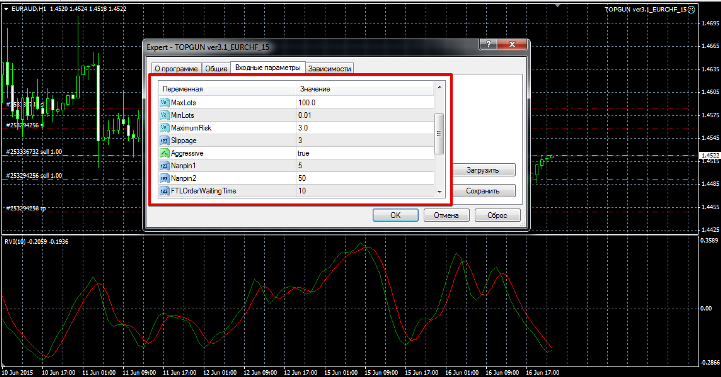
The expert advisor's author hasn't provided the configuration steps, but has provided full details of the money management settings. You can enable automatic lot calculation in the "Use Auto Lot" line of the expert advisor.
In the MaximumRisk line, the maximum risk per position is set.
If you disable automatic lot calculation, enter the initial lot size for trading in the Lot line. In the Max and Min Lot lines, you can set the maximum and minimum lot sizes the Expert Advisor can open with.
Disabling the AGresive function will stop the EA from averaging, but this function is enabled by default. Functions Nanpin 1 and Nanpin 2 are responsible for averaging.
In the Nanpin 1 line, you can change the lot multiplication factor in case of a losing position, and in the Nanpin 2 line, you can change the distance in pips between orders.
The BuyLossPoint and SellLossPoint lines define stop orders for positions. Next come auxiliary settings, which are visually obvious (magic, slippage).
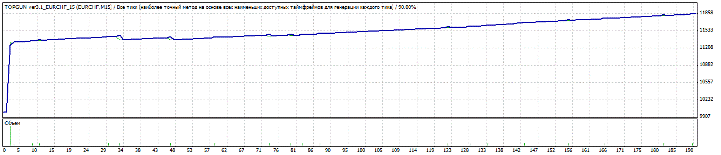
The first test of the Expert Advisor was conducted on the EUR/CHF currency pair on a 15-minute time frame. All settings were left at default. The test period was from January 1, 2015, to May 31, 2015. The test results are shown in the image below:
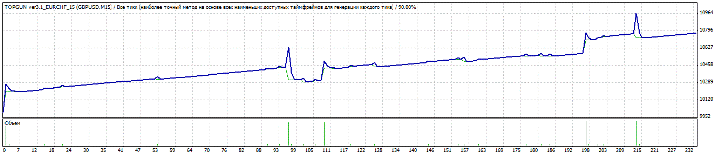
Since the test for the pair suggested by the developer was satisfactory, I decided to test it on the GBP/USD pair. All test parameters remained the same. The test results are shown in the image below:
The third test of the expert advisor was conducted with the same settings, but on the EUR/USD currency pair. The test results are shown in the image below:
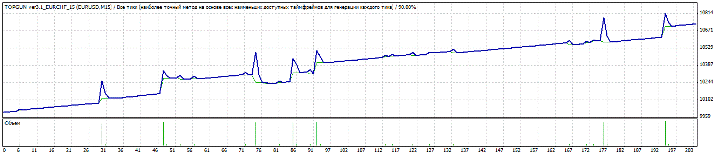
Even though the expert advisor is clearly outdated (it dates back to 2010), it can still generate profits. The only thing you might want to optimize is Nanpin 1 and Nanpin 2, as I'm convinced they're clearly overvalued. I recommend conducting detailed tests, and remember that since the expert advisor uses martingale, the deposit should be at least $100 on a cent account. I recommend brokers like Amarkets and RoboForex. Thank you for your attention, and good luck!

