Advisor Vector
If you observe the price movement, you will notice that its rate of change in different periods of time varies significantly.
To summarize, some instruments exhibit a pattern of movement depending on the Forex trading session.
For example, when Asian trading session As the current period comes to an end, on the main currency pairs with the dollar, we can observe price movement in a narrow corridor, which, when broken, causes a strong price surge.
Many traders began to build breakout strategies based on trading sessions, and indicators were called "boxes" because they outlined the boundaries of a possible price surge in a box shape.
The Vector Advisor is a trading expert based on a trading strategy based on a breakout of a time range formed by a custom indicator.
It's important to understand that the advisor is universal and can be used on any currency pair. The only thing you'll need to do is adjust the settings depending on the specifics of the instrument you've chosen.
Installing a trading expert
To use the Vector Expert Advisor, you will first need to download all the necessary installation files at the end of the article, and then complete the full installation procedure for all components in the MT4 trading terminal.
Installing the Expert Advisor is straightforward. You'll need to copy the downloaded files to the appropriate folders in your MT4 trading terminal's data directory. To open the data directory, launch your platform and select the File menu in the upper left corner.
Next, you'll see a list of options. Find "Data Catalog" and launch it. After launching the catalog, you'll see a series of platform system folders. Find the folders named Libraries, Include, and Indicators. Drag the files from the downloaded folders with the corresponding names into them, then close all the folders in the catalog.
In order for the terminal to be visible to the expert, you should perform an update in the navigator panel, or simply restart the trading terminal.
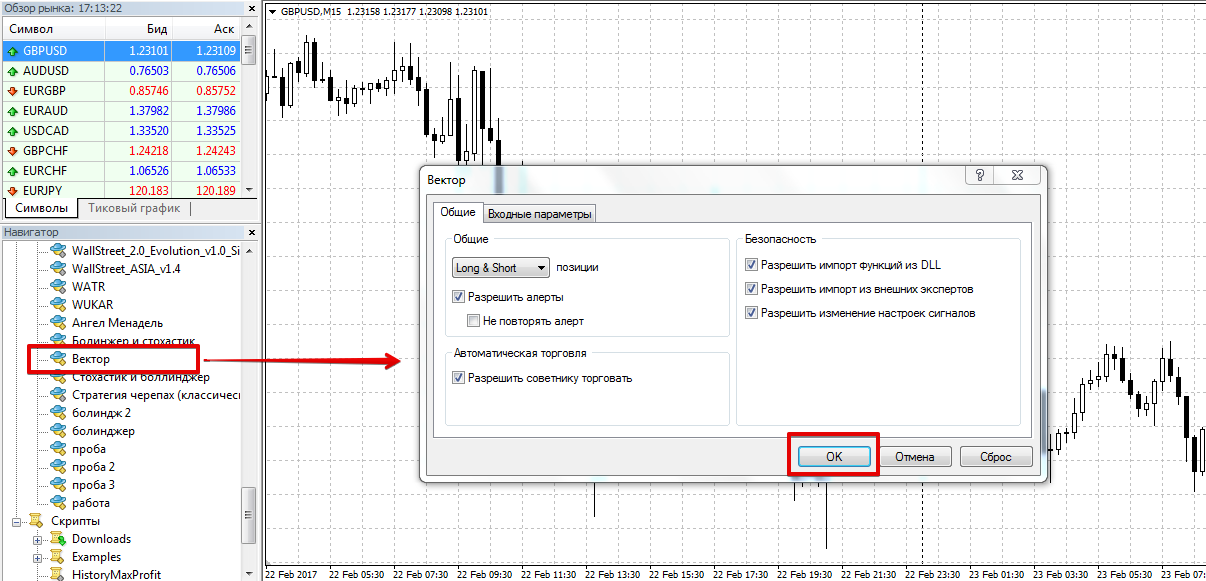
After restarting the platform, Vector will appear in the list of advisors. To start trading, drag it onto the fifteen-minute chart of your chosen currency pair.
Vector Advisor Trading Strategy
The Vector advisor uses a breakout trading strategy based on a custom indicator. Early in the morning, between 6:00 and 8:00 AM, the expert uses the indicator to identify a time zone and place buy-stop and sell-stop pending orders along its boundaries.
The expert advisor enters the market with three orders in the same direction but with different targets, with the stop order set either by the box size or by a specified value. The Vector advisor does not use averaging.
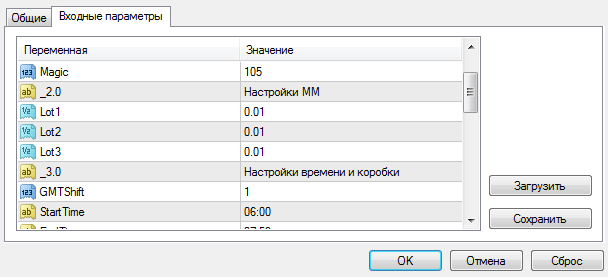
The advisor settings contain all possible parameters that can in one way or another affect the strategy's profitability.
So, in the lines Lot 1, 2, 3 you can set the volume for each of the three positions, while in the lines TakeProfit 1, 2, 3 you can specify the profit for each of the positions in points.
In the GMTShif line you need to specify the time offset of your broker Greenwich Mean Time (GMT). To do this, subtract GMT from the time displayed in your terminal and enter the resulting value.
In the StartTime and EndTime lines, you can specify the time when pending orders will be placed, and in the DelTime and CloseTime lines, you can set the time for deleting and closing orders.
In the DeltaUp and DeltaDown lines, you can set the offset in points from the box boundaries at which pending orders will be placed. In the Orders line, you can set the number of orders the Expert Advisor will use to enter the market (maximum 3), and in the StopLoss line, you can set a stop loss that will be placed for all orders.
The advisor also has the ability to use a trailing stop by specifying the number of points in the Trall line, and to use a breakeven stop by specifying the number of points for moving the stop to a breakeven stop in the NoLoss line.
History testing
It's worth noting that the advisor's settings are outdated. However, despite this, we decided to test it for the entire year of 2016 with the default settings on a 15-minute Forex chart for the GBP/USD currency pair. The results are below:
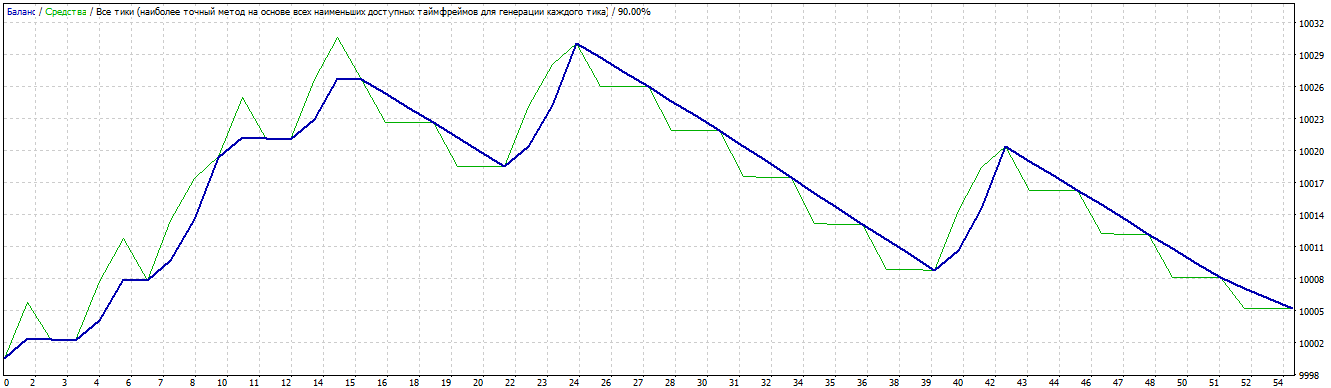
That's why we decided to hold advisor optimization by key parameters. The result after optimization is shown below:
As you can see from the graph above, after optimizing the basic parameters, the expert's profitability reached 100 percent per annum, and this is far from the limit.
It's worth noting that the advisor opens a small number of orders, so if you're an active trader, you might find using the Vector expert advisor rather boring.
Download advisor vector.

