Strategy for trading in the European Forex session
The impact of Forex trading sessions on the profitability and effectiveness of strategies simply cannot be underestimated.
So, many traders, and especially novice scalpers, make two fatal mistakes: they trade the wrong asset at the wrong time.
As a result, instead of observing an active market response to the received signal, the trader sees a very sluggish market.
Naturally, in conditions where the price is practically motionless and enters a deep flat, trading effectively is simply impossible due to the fact that the probability of losses increases significantly.
At the same time, traders who focus on just one trading session, which coincides with the peak market activity for a given currency pair, achieve phenomenal returns because they don't waste their time and energy on inactive market segments.
In fact, one of the most active trading sessions for major currency pairs is the European one, and in this article, we will look at a very simple scalping strategy designed specifically for this time period.
It is worth noting that it can only be used during the European trading session, on currency pairs with the euro or the British pound, namely EURUSD, GBPUSD, EURGBP.
The working time frame of the tactic is a five-minute chart of the previously listed currency pairs.
Setting up a strategy for trading in the European session
To apply a custom trading strategy based on technical indicators, you will need to download the strategy files at the end of this article, then install the indicators and template into your MT4 trading terminal.
The procedure for installing the strategy is practically no different from installing any other custom strategy. Specifically, you'll need to place the downloaded indicators and template in the appropriate folders of the trading terminal's data directory.
To access the data catalog, launch your platform and click the File menu in the upper left corner. You'll then see a list of options. Find and select "Open Data Catalog.".
After launching the catalog, a list of the platform's system folders will be displayed on your monitor screen. Find a folder called Indicators and drop the downloaded indicators into it. Also, find a folder called Template and drop the template into it.
In order for the trading platform to see the installed files, it should be updated in the navigator panel or restarted.
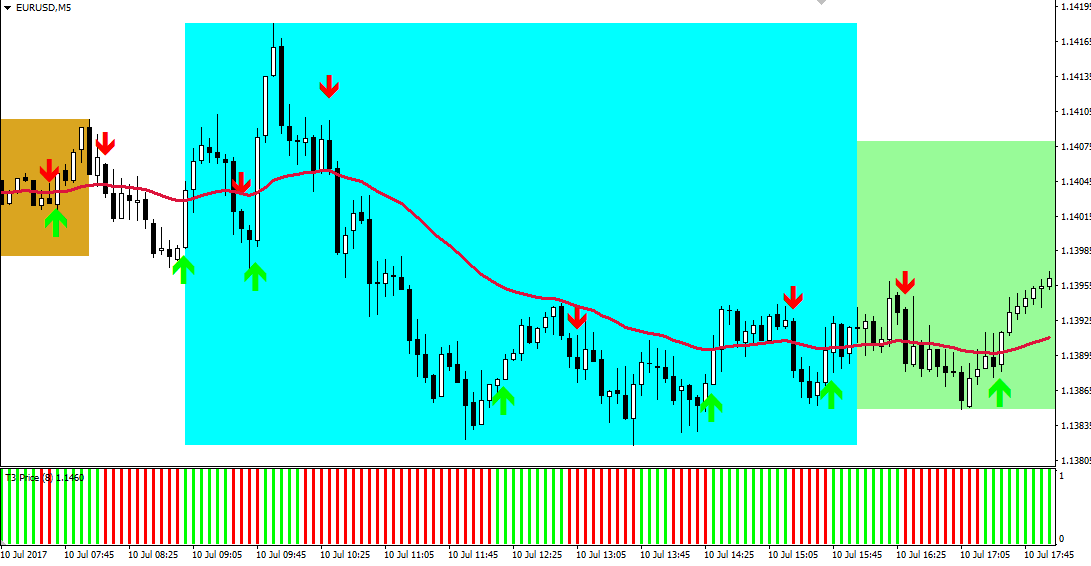
After updating the terminal, open a five-minute chart for one of the listed currency pairs and run a template called "Euro Plus" on it. You'll get a graph like this:
Brief information on the strategy. Signals
To determine trading sessions, the strategy incorporates the i-Session technical indicator, which colors areas of the chart accordingly.
When it comes to the European session, the indicator colors this area blue. It's worth noting that the indicator uses the time specified in the settings and the time of your trading terminal to plot trading session areas, so before starting trading, it's crucial to check the time to ensure the indicator displays the European session correctly.
When trading during the European trading session, it is important to understand that this is the period when key statistics on European countries are released en masse.
There's no point in avoiding news trading, as all the activity this trading session is driven by the release of key statistics. So, let's move on to the trading signals themselves.
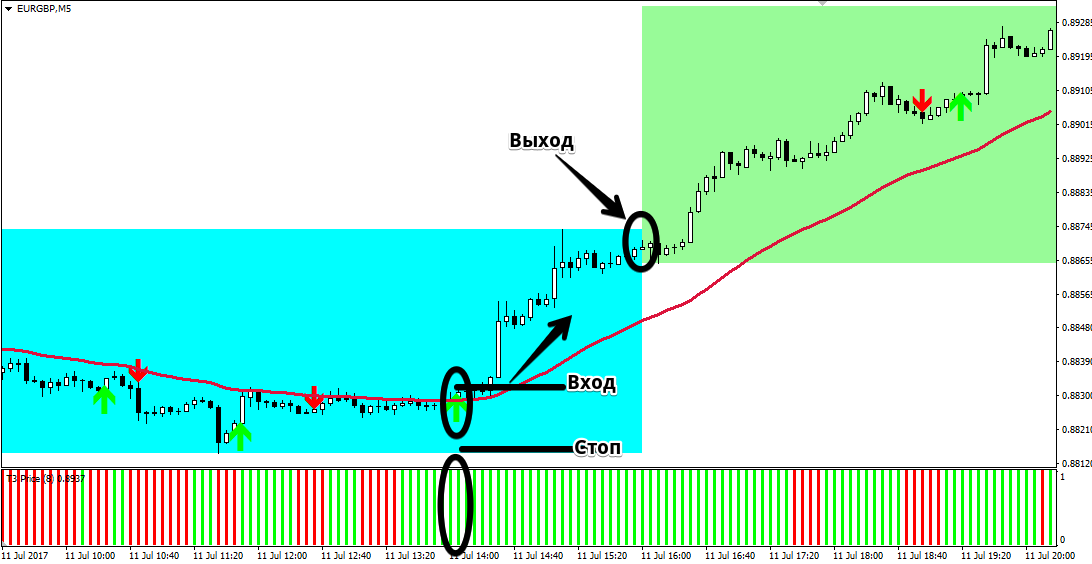
Buy signal:
1) The i-Session indicator turns the area blue.
2) The price is above the 40-period moving average.
3) The Trend Master indicator displays a green upward arrow.
4) The T3 color Histo indicator column is colored green.
After opening a position, a stop order should be set at the local minimum level; the profit should be 5-10 points greater than the stop order.
If the order is not taken profit or stopped by the end of the European trading session, it must be closed manually and the result recorded. Example:
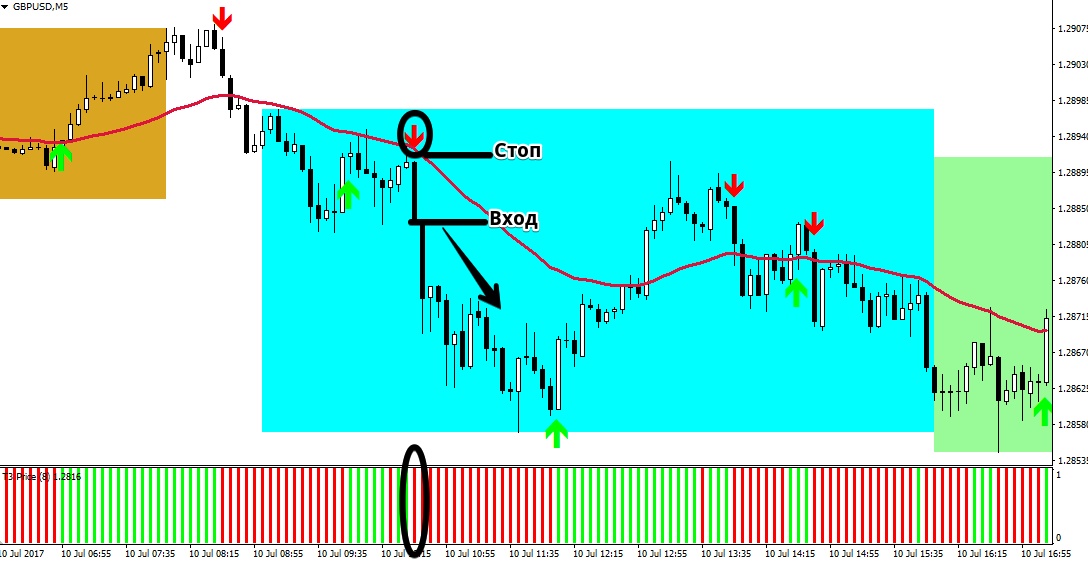
Sell signal:
1) The i-Session indicator turns the area blue.
2) The price is below the moving average with a period of 40.
3) The Trend Master indicator displays a red downward arrow.
4) The T3 color Histo indicator column is colored red.
After opening a sell position, a stop order should be set at the local maximum, with the profit being 5-10 points greater than the stop.
If the order has not reached its target by the end of the European session, it should be closed manually.
In conclusion, it is worth noting that trading on European Forex trading session has a number of features that are caused by the high market activity in the main currency pairs during this period.
However, this period is the most favorable for all scalpers on the Forex market.
Download the strategy template.

