cTrader Trading Platform – The Professional's Choice

Whatever anyone says, the MT4 trading platform, beloved by many seasoned traders due to its abundance of software solutions, was designed for trading on standard accounts, meaning that an intermediary—your broker—stands between you and the market.
MT4 was truly ideal for this type of trading, as its speed and signal processing, along with its user-friendly functionality, truly make it the best solution.
However, with increasing competition in the brokerage sector, companies are constantly being forced to improve and enhance their trading conditions, leading to the emergence of ECN accounts.
ECN accounts are characterized by the complete absence of intermediaries; you trade directly with market participants, which means commissions, order execution speed, and trading capabilities are simply on a whole new level—something the beloved platform simply cannot provide.
RoboForex, a leading Forex brokerage company, has launched its revolutionary new ECN trading platform, cTrader.
The cTrader platform offers a more in-depth look at market data, as it features three different order books, each capable of capturing the full depth of the market. Thanks to the platform's ECN focus, order opening takes less than a second.
Installation. Appearance.
After downloading the platform from the RoboForex website, you'll need to install it. Generally speaking, installing cTrader is similar to installing any Windows program, so there shouldn't be any issues.
After the first launch, you'll need to enter your login and password, which you'll receive in your brokerage account. It's worth noting that it doesn't matter whether you're using a real or demo account; you won't need to adjust any settings or access the service. After the first launch, you'll see the following interface:
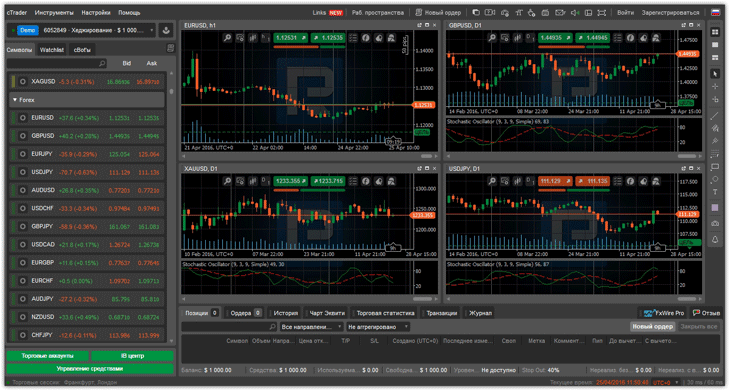
Similar to MT4, cTrader has three main workspaces: the symbol area on the left, where you can select any currency pair; the chart area in the center; and the information area below, displaying open positions and historical data from the log.
The first thing that immediately catches every trader's eye is the well-organized symbols. In the symbol area, you can see groups such as forex, metals, indices, and so on.
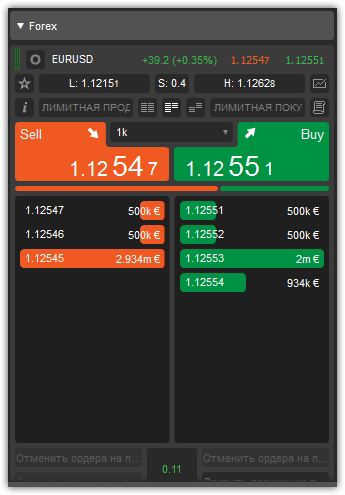
It's also worth noting that stocks are divided by both sectors and countries, making it much easier to find the instrument you need. By clicking on the symbol you're interested in, you can view the market depth. By default, you can use three types of depth charts, which can be switched between and display real bank orders.
Technical capabilities. Working with charts
. The cTrader trading platform has built-in non-standard chart periods. By default, you can switch to the following time frames: m1, m2, m3, m4, m5, m6, m7, m8, m9, m10, m15, m20, m30, m45, h1, h2, h3, h4, h6, h8, h12, d1, d2, d3, w1, mn1.
It's also worth noting that the platform has three default chart types: candlestick, bar, line, and point. An example of a scatter plot is shown below:
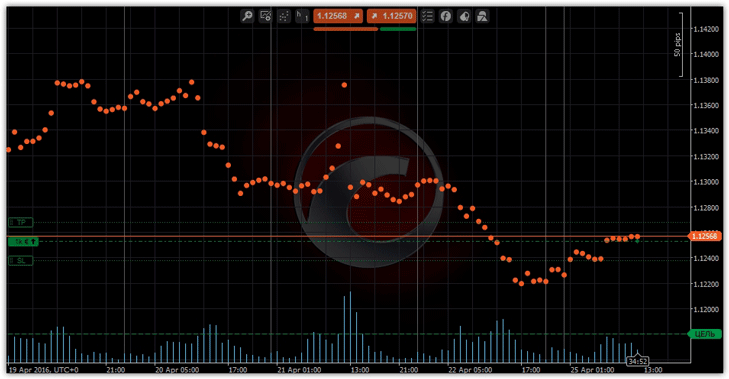
Chart Analysis Tools and cTrader:
When getting to know the platform, the first difficulty we encountered was finding the graphical analysis tools. The developers rather awkwardly placed the toolbar on the right, which blends in with the background. To help you find it, see the image below:
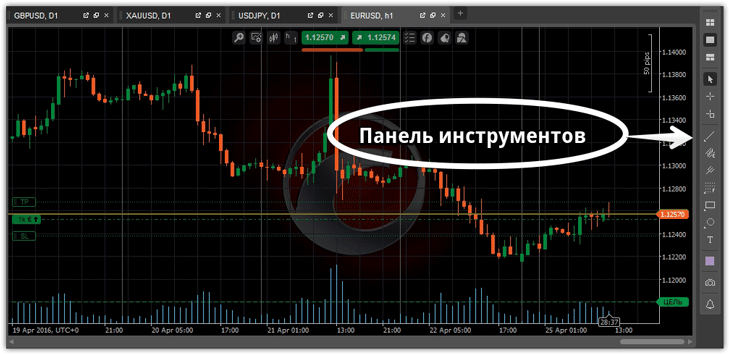
Working with tools is very simple: simply select the desired icon and manipulate the chart itself. Available graphical analysis tools include vertical lines, trend lines, horizontal lines, ray lines, equidistant channels, Andrew's pitchfork, Fibonacci lines, Fibonacci fans, Fibonacci extensions, arrows and symbols, and shapes.
The platform also features two interesting extensions: sound price alerts and chart screenshots at the click of a button.
Technical Analysis Tools and cTrader:
In terms of technical analysis, cTrader developers have made significant strides, integrating over 50 different technical indicators into the platform. To add any indicator to the chart, right-click on the chart and open the additional menu, which will contain the "Indicators" option.
As in MT4, the developers have divided the indicators into the following categories: Trend, Oscillators, Volatility, Volume, Other, and Custom. To remove an indicator from a chart, go to the “Objects” section in the same menu where you added the indicators and delete the tool you no longer need.
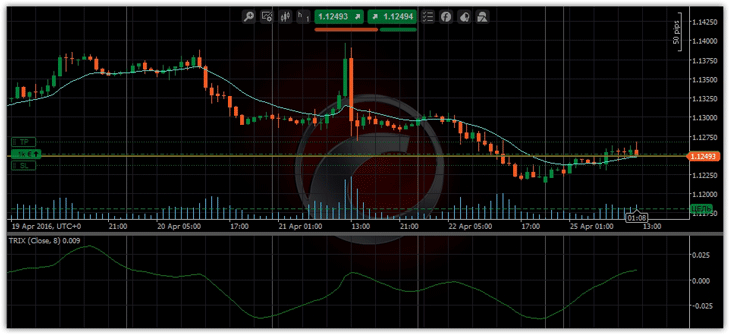
In addition to standard indicators, you can use custom ones, either program them yourself or download them from any information resource.
Opening a position is a subtle advantage that simplifies your work.
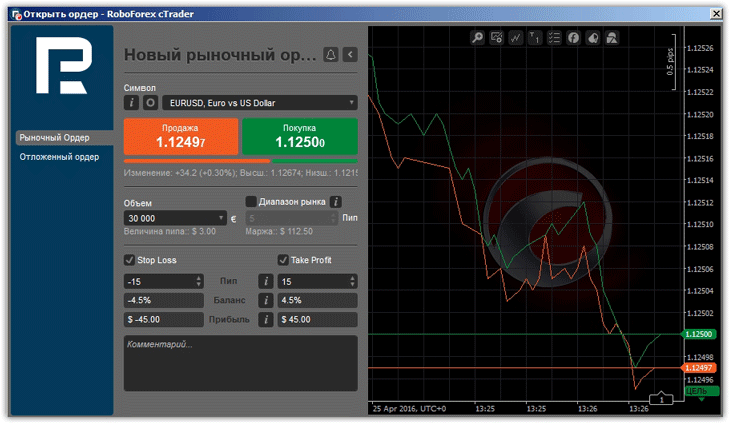
The process of opening orders is virtually identical to trading on the MT4 trading platform. By default, you can use two methods to open positions: one click in the symbol panel or by calling up an additional menu.
You can work with both market and pending orders. When setting a stop order in points, the terminal automatically displays the potential loss as a percentage, as well as the potential gain based on the specified profit. When opening your first position, you'll be surprised to see the monetary equivalent of the volume instead of the usual lot size, which is considered standard for all professional platforms.
Working with Open Orders. Trader Statistics.
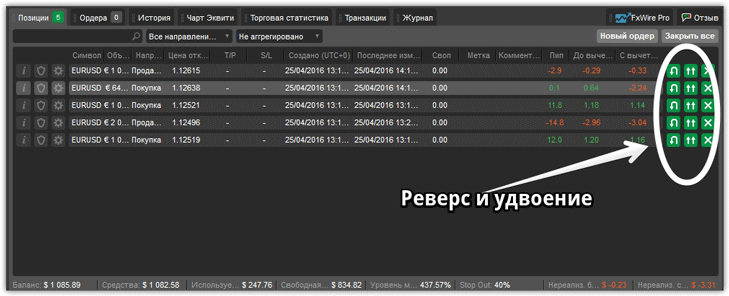
In the cTrader trading platform, the developers have implemented two simple yet useful functions: reversing and doubling a position. For many traders, this may seem like a minor detail, but implementing this feature in MT4 often requires the use of various scripts.
To perform the operation, click the corresponding icon in the trade list or directly on the chart:
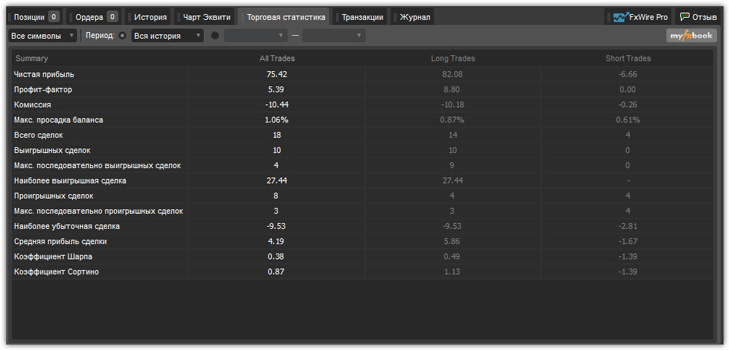
After closing a certain number of trades, you can view detailed statistics on your trading strategy. Select the "Statistics" tab in the bottom trade panel.
The terminal will automatically show you the profit factor, net profit, commission, maximum balance drawdown, number of winning and losing trades, Sharpe ratio, Sortino ratio, and much more for a given period.
In conclusion, it's worth noting that the developers of the cTrader trading terminal are constantly developing and updating the program, improving and expanding its functionality. Today, cTrader is the best trading platform for ECN trading.
You can download the trading platform from RoboForex at http://www.roboforex.com/trade-conditions/ctrader/

