Superior Forex Desk – expanding the capabilities of MT4.
As you develop your own strategy and actively trade, you begin to encounter  the insufficient functionality of the MT4 trading platform.
No, of course, when it comes to market analysis, MT4 is one of the best platforms, but when it comes to routine, automatic actions, such as closing all profitable trades, reversing, or locking a position, the platform is less self-sufficient, since everything has to be done manually.
Many traders start using "Scripts" to make their lives easier, but when these additional tasks become more than five, they start to get confused and make stupid mistakes with the scripts as well.
Superior Forex Desk is an advisor assistant from InstaForexthat incorporates all the additional functions for managing open positions, as well as a number of useful features that significantly speed up order processing.
Installing Superior Forex Desk
Superior Forex Desk is installed using the same installation method as the program itself, rather than by manually copying and pasting the file into the terminal's data directory. To install, click the downloaded file and specify the exact path to your terminal's data directory in the destination field.
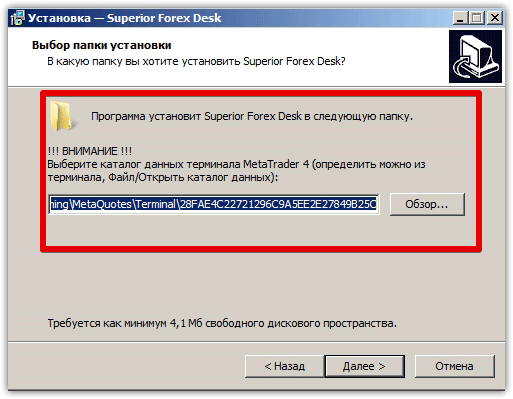
After you specify the destination path, the installer will automatically replace and install all files in the terminal data directory, and Superior Forex Desk will appear in the list of advisors after restarting the trading terminal.
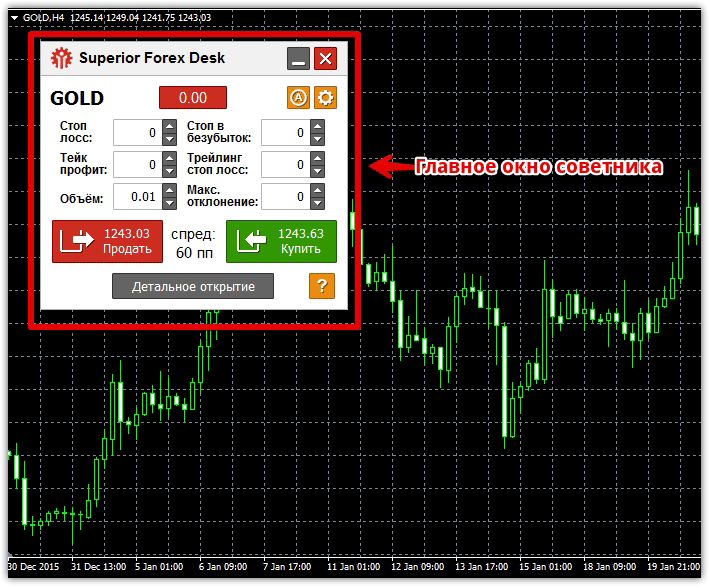
To get started, drag Superior Forex Desk onto the chart of any currency pair. You'll see the following application:
Main Window Functionality
When you first launch the advisor, it feels like nothing more than a one-click trading app. In reality, the first thing you see are two buttons—buy and sell—as well as fields for setting stop loss, take profit, volume, and instrument name.
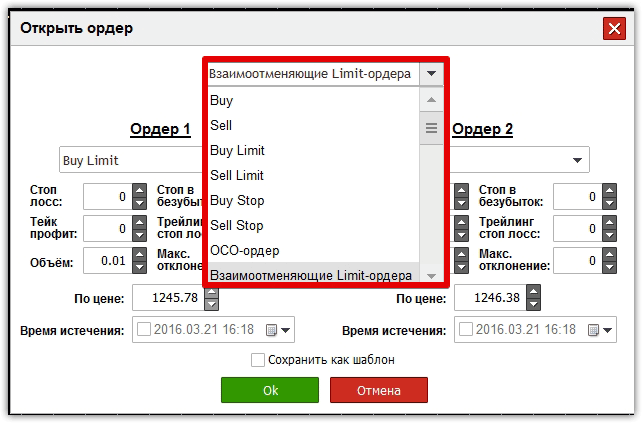
However, by clicking on the "Detailed Opening" button below, you immediately get additional options for opening mutually canceling stop and limit orders, as well as OCO orders.
The essence of an OCO order is that you set a specific condition, upon which some pending orders are automatically deleted, while others are triggered. In practice, this works like this: if the price rises by 20 pips and a pending order , then other pending orders should be automatically deleted.
Functionality of the "Actions on open orders" window
To launch this additional window, click the red rectangle next to the symbol's name in the main window. This will open an additional menu:
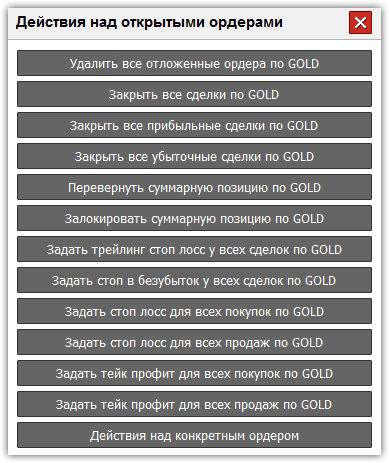
The menu automatically assigns the symbol name to each row, based on the symbol we applied the EA to and opened trades on. So, by clicking "Delete all pending orders," the EA will automatically delete all orders with the assigned currency pair.
You can also close all trades for a specific instrument, close only profitable or losing trades, set a trailing stop for all trades for a specific symbol, set a stop loss for all trades, or only for buys or sells.
By clicking on the "Reverse Total Position" line, the advisor will automatically close all open orders and open a position in the opposite direction, but with the total volume of closed orders.
It's also possible to lock a total position. To assign a specific task to a specific order, rather than all open orders, go to the "Actions on a specific order" menu.
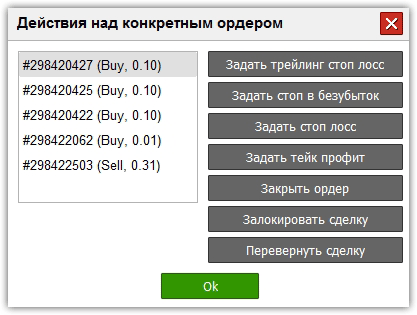
When you open this additional menu, a list of open orders is displayed on the left, where you can select the transaction you are interested in and perform the following actions:
1) Lock the order
2) Close the trade
3) Reverse the trade
4) Set the profit and stop in points.
5) Specify a trailing stop.
6) Move the position to breakeven when the price moves a certain number of points.
In conclusion, I'd like to note that InstaForex developers, by creating Superior Forex Desk, have significantly simplified the lives of traders who actively use grid trading strategies, as well as techniques such as position locking and reversal.
In addition, Superior Forex Desk is an indispensable assistant for traders who work with a large number of simultaneously open orders.

