GUI-Robot – automated trading without programming knowledge
The modern realities of stock trading are such that programmed algorithms have almost completely displaced traders from manual trading.

Typically, in today's world, traders are tasked with monitoring and confirming signals, as well as acting as a master who will promptly make adjustments to their pre-programmed algorithm.
However, creating an autonomous algorithm that can replicate you and your strategy is quite expensive, not to mention the difficulty of communicating your wishes to a programmer, who writes programs and has no connection to exchange trading.
Frustrated nerves and wasted money are just a few of the challenges you face if you don't know a programming language. While you can certainly spend years learning code, there's another approach.
This platform includes two unique modules, GUI-Robot and iScanner, which allow you to implement trend strategies and receive market entry signals based on graphical and technical analysis.
You can also not only create your own trading algorithms, but also use those of others that have demonstrated results in the accounts of other company traders.
Launching GUI Robot
In order to run the GUI-Robot, you must be the owner of the iTrader trading platform, which can be downloaded and installed from some of the brokersOnce you've launched iTrader, look at the top line and click "Order.".

In the menu that appears, select the "Robots" section. You'll see two GUI-Robots: one for a correlation-based strategy and one for a trend-following strategy. Select the one you'd like to implement.
GUI-Robot and Strategies:
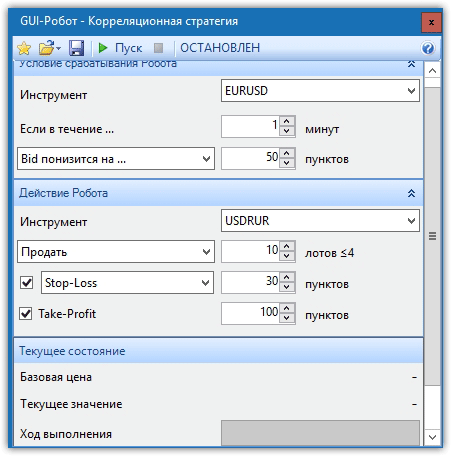
iTrader developers implemented the GUI-Robot, dividing it into two global strategies: correlation and trend-following. After launching a correlation strategy, you'll need to specify the asset used for comparison and the identified pattern, as well as the asset to be traded.
In the trade opening conditions, you can specify the number of pips the asset must rise or fall by per unit of time for the GUI-Robot to open a trade in a specific direction with the specified stop loss and take profit.
correlation -based strategies , but you must independently identify these patterns.
The second GUI-Robot allows you to implement trading strategies based on a number of standard technical indicators. In terms of conditions, this robot can fulfill the conditions "If the indicator crosses from above" or "If the indicator crosses from below," which is suitable for implementing strategies based on indicators such as RSI, Stochastic, ADX, AO, Envelope, MACD Histogram, Line, and Williams Percent Range.
To program a specific action, first select the instrument you will be trading. Next, select the indicator and define the condition. In the second forty conditions, specify a specific level.
For example, if you want the GUI-Robot to buy if the indicator line crosses level 30 from below, enter the RSI indicator, and the Support Line indicator in the second, specifying level 30. To buy, be sure to specify "If the indicator crosses from below" in the conditions and select the action: buy or sell.
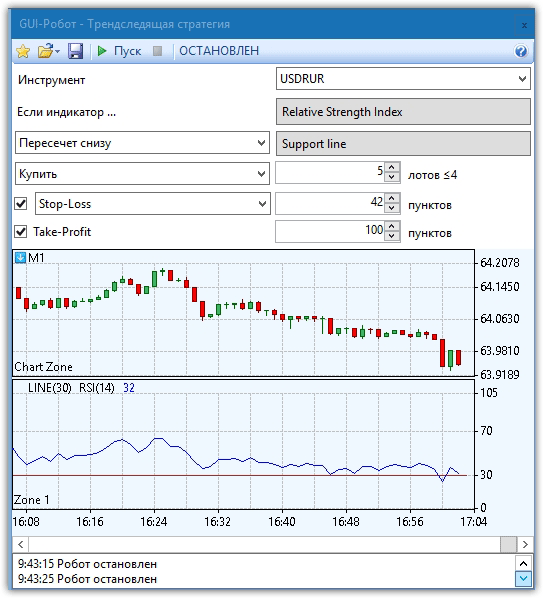
After you set the action, specify the stop loss and profit for the robot and click "Start" to start trading.
iScanner
In addition to automation and the creation of automated algorithms, the developers have implemented iScanner, which allows you to receive audio signals based on the most common candlestick patterns, technical analysis indicators, and a number of price movement patterns.
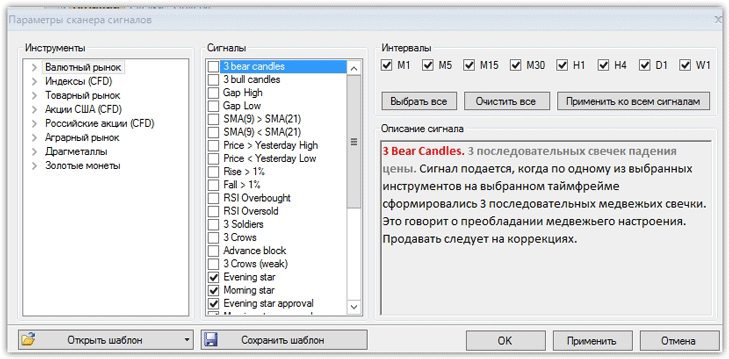
To enable sound alerts, first select an asset—specifically, a currency pair, stock, index, or precious metal—and the timeframe for trading and signal search.
You can choose from the following candlestick patterns: Three Crows, Three Soldiers, Evening and Morning Star, and Engulfing. You can also enable alerts for ascending and descending gaps, breakouts of yesterday's high or low, breakouts of yearly and monthly levels, price rises or falls by more than one percent, and rapid rises or falls (candlestick size significantly larger than previous ones).
In addition to candlestick and chart analysis, you can enable alerts based on technical indicators, such as when the RSI exits overbought and oversold zones, when two moving averages cross, when the MACD histogram the signal line, and a number of other technical indicator alerts.
In conclusion, I would like to note that GUI-Robot and iScanner allow you to significantly simplify the trading process, as well as receive signals based on basic models of both technical and candlestick analysis.

