Calculation of market volatility.
A convenient script that automatically calculates Forex volatilityand uses the resulting data to place stop-loss or take-profit orders, as well as for other purposes.
The program is quite simple and requires virtually no configuration. To calculate market volatility for a given period, simply follow these steps:
1. Download the volatility calculation script; the link to the file is at the end of the article.
2. Install according to the standard procedure, as described in the article "Installing a Forex Indicator." Just copy the scripts to the "scripts" folder.
3. Launch the trader's trading terminal and find the "AverageRange" scripts in the folder. Click on it and proceed to settings.
4. Settings – on the "General" tab, leave everything as is and go to "Input Parameters." Here, you can set the time period over which the volatility calculation will occur. It's important to remember that it's best to use the planned duration of trades rather than the time frame name as the initial parameter.
For example, for M30, set the start and end of the calculation period to at least 6 hours, record the results, and then calculate for 30 minutes. This approach will provide a more complete picture.
For efficiency, you can save the initial settings for specific time periods and then use them later to save time.
When saving, you must delete everything in the file name line, otherwise the saving will not occur.
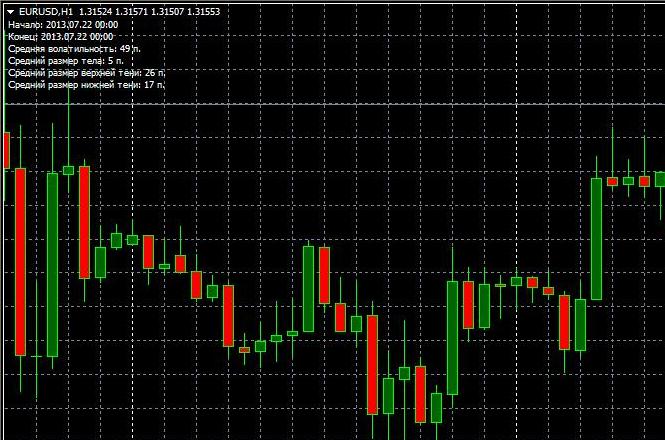
The calculation data is displayed in the upper left corner of the trader's trading terminal:
• Average market volatility for the specified time period in points.
• Average candlestick body size.
• Size of the upper and lower candlestick shadow.
In just a few clicks, you get valuable information that can be used, for example, to set a take-profit order. For example, if the average daily volatility is 150 points, the take-profit size should be at least less than this figure.
Download the "Volatility Calculation" script.

