Forex indicator strategy "Trend trix Cycle"
The use of technical analysis is one of the main areas of trading within day  trading.
By combining technical indicators, traders have the opportunity to create their own trading strategies, taking into account the pros and cons of each element. A well-designed combination allows you to structure your trading into a systematic approach, rather than chaotic trades without any basis for action.
The "Trend Trix Cycle" indicator-based Forex strategy allows you to trade any currency pair, as the combination of a trend indicator and a number of oscillators makes the strategy universal and unpretentious to a specific instrument.
The strategy is aimed at trend movements, so to avoid unnecessary market noise, the author suggests trading on a thirty-minute chart or higher.
Download the Strategy Template
All indicators included in the trading strategy are designed specifically for the Meta Trader 4, so you must install them before starting. To do this, go to the data directory and place the indicators downloaded at the bottom of this article in the "indicators" folder, and place the template in the "Template" folder.
After updating, go to the template list in the Navigator panel and launch "Trend Trix Cycle." If you haven't missed anything, your desktop will look like this:
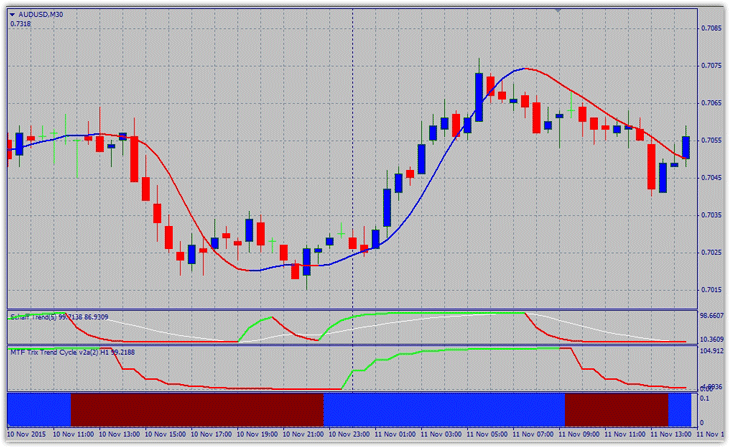
Basic elements of the indicator strategy.
The strategy is based on four indicators, each of which equally influences position entry. However, one trend indicator and three oscillators, which are located in additional windows, can be safely distinguished.
1) Mega Trend – located directly on the chart and displayed as a red and blue line. This is essentially a standard moving average, so you can customize the moving average period and shift in the settings to suit your preferences.
2) Schaff Trend – located in the first additional window, it contains two indicators. In the settings for each line, you can see the indicator period. Schaff Trend itself is based on moving averages, allowing you to easily adjust the settings to suit your needs.
3) MTF Trix Trend – a popular indicator taken from the THV trading strategy. It's located in the second window and acts as a filter. You can change the indicator's period in the settings, increasing its sensitivity or smoothing.
4) MT4 TRENDPRO – all settings are closed, so it cannot be optimized.
Signals
The following conditions will serve as a signal to enter a buy position:
1) Mega trend indicator is blue.
2) Schaff Trend indicator is green.
3) MTF Trix Trend indicator is green.
4) MT4 TRENDPRO indicator is blue.
All conditions must be strictly met, and they rarely appear simultaneously, so it is necessary to wait until the complete configuration of conditions is built.
Stop losses should be set at local lows and highs. Profit is equal to two stop orders. For example, see the image below: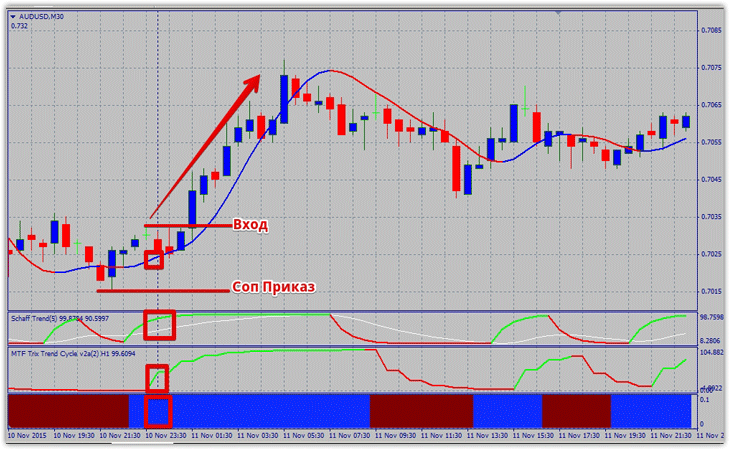
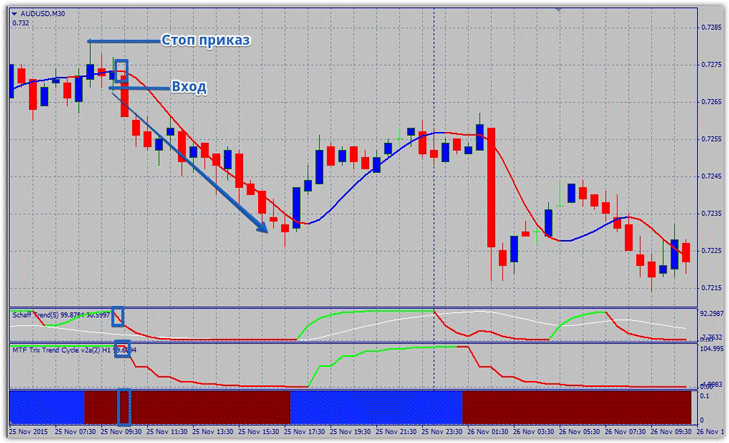
The following conditions will serve as a signal to enter a sell position:
1) Mega trend indicator is red.
2) Schaff Trend indicator is red.
3) MTF Trix Trend indicator is red.
4) MT4 TRENDPRO indicator is red.
All conditions must be strictly met, and they rarely appear simultaneously, so it is necessary to wait until the complete configuration of conditions is built.
Stop orders should be placed at local highs and lows. The profit is equal to two stop orders. For an example, see the image below:
Risk Management: An Alternative Exit
Many people mistakenly perceive losing trades as painful and abandon their strategy. Remember, stop orders are part of the system, and no professional trader in the world trades without intermediate losing trades.
Therefore, calculate your lot size wisely, but remember that the risk per position should be two percent, and even less for initial trades. For an alternative exit strategy, you can use the Mega Trend indicator, specifically closing the position if the line color changes to the opposite of your signal.

