Trendwave indicator
Trendwave is a unique development by a foreign trader, which is  an oscillator indicator based on overbought and oversold zones.
Just a year ago, this indicator was impossible to find freely available, as its author was selling it on various trading platforms for a rather large sum.
Of course, as is usually the case in trading, sooner or later everything paid for becomes free, since it only takes one dissatisfied person for this miracle to become freely available.
According to the author of Trendwave, his indicator shows possible price reversal points, which has allowed him to make a considerable fortune.
Moreover, the author notes that this is not a typical oscillator that is only profitable during flat periods, but a fully functional indicator for all market segments. Therefore, given its effectiveness in identifying new trends, the indicator has been given the symbolic name "Trend Wave.".
Among users who have already tested the indicator, the feedback is rather mixed. Some claim that it truly works and shows reversals, demonstrating their actual trades, while others claim the exact opposite.
Therefore, I do not recommend treating this tool as the Holy Grail, but rather using it as one of the effective tools in your trading strategy.
Since Trendwave is a proprietary development, it isn't included by default in the Meta Trader 4, so you'll need to install it. To do this, download the indicator at the end of this article. Next, open your trading terminal's data directory via the File tab and place the indicator in a folder called "Indicators."
After installing the indicator, you'll need to restart the trading platform for it to appear in the list of instruments. After restarting, go to the indicators menu and drag Trendwave onto the currency pair chart.
A settings window will appear. In the Wave Period line, you can change the indicator's calculation period, and in the AVG period line, you can adjust the indicator's line smoothing. If you've done everything correctly, the indicator should appear in the first additional window as two red and green lines:
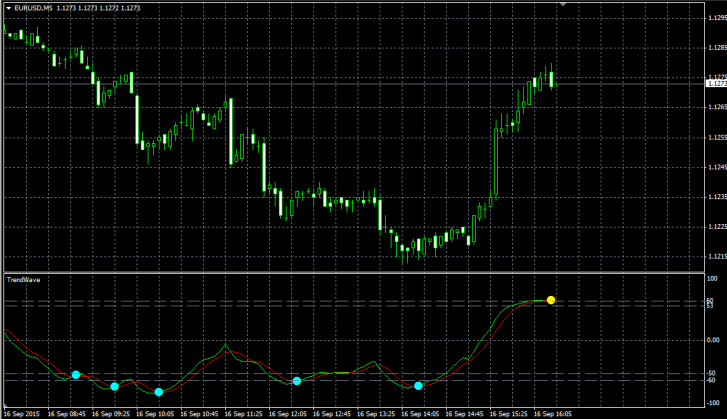
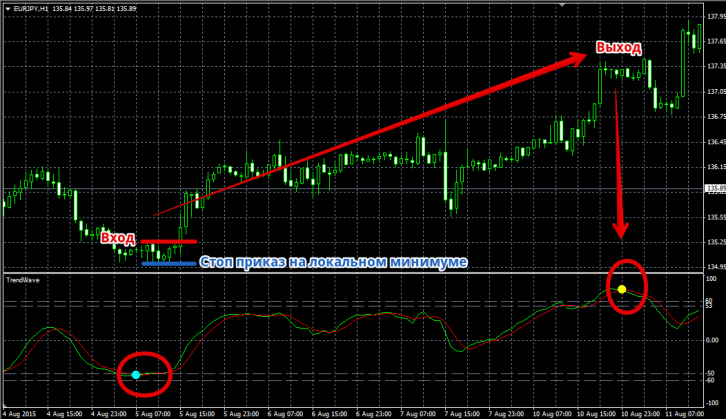
Trading with this tool is very simple. As you can see in the image above, a market entry point. Therefore, a buy signal is triggered when the price breaks out of the oversold zone and the blue dot appears.
A stop order should be placed at the local minimum, and the position can be exited at a predetermined profit equal to the stop order or when a signal in the opposite direction appears. You can see an example in the image below:
A sell signal occurs when the indicator line exits the oversold zone and a yellow dot appears. We set a stop loss at the local high, and set the profit target equal to the stop loss. You can also exit on the opposite signal. You can see an example of a sell trade in the image below:
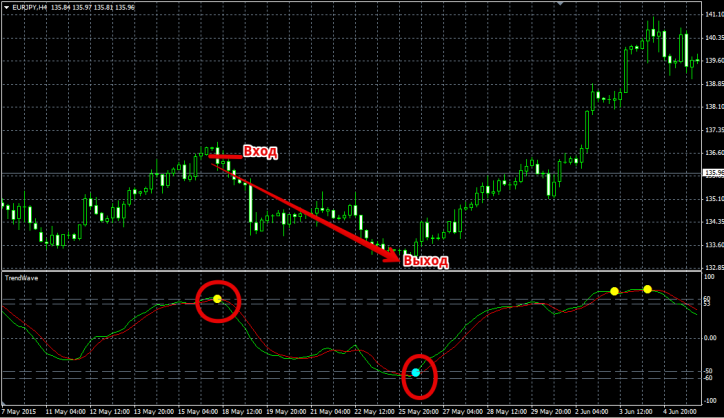
Despite all the claims by the indicator's author and those who liked it that it works well in both trends and flats , historically it turns out that Trendwave is designed for flat trading and produces a lot of false signals during a prolonged trend. To avoid being overly optimistic, you can see this for yourself by looking at the image below:
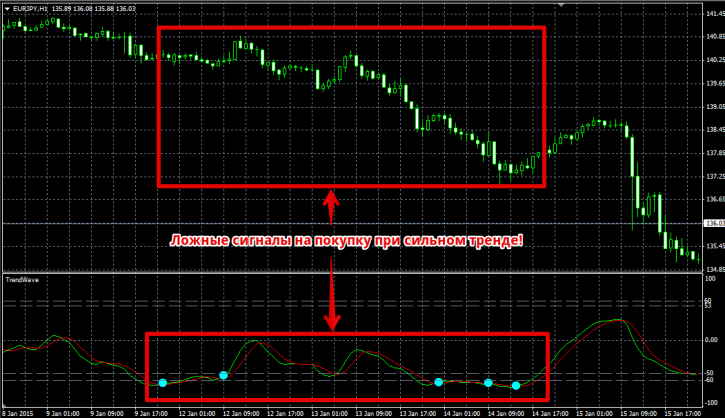
In conclusion, I'd like to say that it's not worth chasing potential price reversals, as no indicator has yet been invented that can 100% predict when a trend has run out of steam and is about to reverse. Therefore, I recommend using this tool only if you observe a clear flat market, and treat the emerging signals not as a trend reversal, but as a possible trend pullback.

