MACD Squeeze. An interesting hybrid based on trading zones for MT5.
Standard Forex indicators are not only classic technical analysis tools that every trader should consider, but also a huge field for new developments.

The most interesting thing is that sometimes standard forex indicators can undergo incredible transformations, from their appearance to the very concept behind their creation.
However, while in most cases, modified versions can only boast a beautiful appearance and, as a rule, unchanged logic, in today's article we will examine a fundamentally new MACD.
While it is virtually identical in appearance to the standard indicator, it embodies a completely different concept.
The MACD Squeeze indicator is a technical analysis tool that belongs to the group of trend oscillators and is an upgraded version of the MACD for the MT5 trading terminal.
A notable feature of the MACD Squeeze, which distinguishes it from the standard version, is its ability to identify trading zones within which the standard indicator's signals become more accurate.
The tool itself is universal and can be applied according to the same principles as MACD, which means that the indicator can be used on all currency pairs without exception.
It's also worth noting that MACD Squeeze is ideal for all traders who rely on technical analysis, as it can serve as both a filter for your strategy and a signaling tool.
The indicator can be safely used on absolutely any time frames.
Installing MACD Squeeze in MT5
The idea of defining trading zones within which the probability of a movement being realized is an order of magnitude higher is far from new, but its implementation using the MACD indicator, and even for the MT5 trading terminal, has only recently become possible.
The indicator itself can rightfully be called a new product, as it was created in 2018. Since the tool was included in the official MT5 developer library, you can use it not only for free, but also install it in two different ways.
The first installation method is via the library, and the second is via the standard data directory.
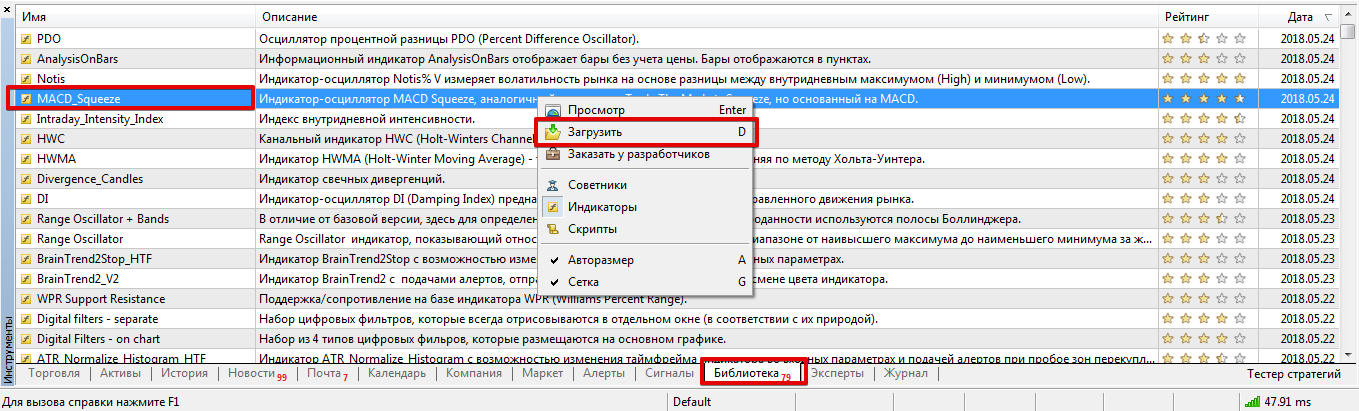
If installation via the library fails, use the second method: download the indicator file at the end of the article and place it in the appropriate folder in your MT5 data directory, specifically the "Indicators" folder.
Regardless of how you installed the indicator, be sure to restart the trading terminal or update it in the "Navigator" panel so that the indicator appears in the list of custom indicators.
Using the indicator. Settings:
After applying MACD Squeeze, you'll see a classic two-color histogram on your chart, which is virtually identical to the standard MACD.
However, if you look more closely, you'll see gray and blue diamonds near the zero line.
The blue diamonds indicate that an effective trading zone has been established within this market segment using Bollinger Bands and the Keltern Channel. Gray diamonds indicate the absence of these zones.
In terms of application, MACD Squeeze can be used both as a signal tool and to filter out losing trades.
When using this indicator as a signal tool, a buy position should only be opened when the histogram crosses level 0 from the bottom up and a blue diamond is present.
To open a sell position, wait until the histogram crosses level 0 from the top down and a trading zone is present.
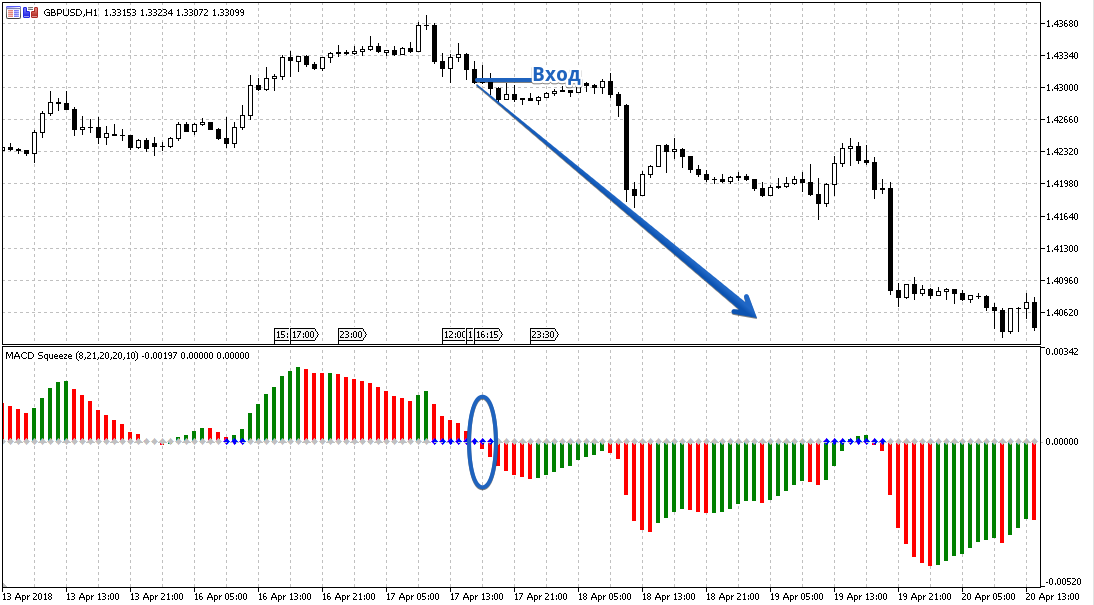
When using MACD Squeeze as a filter for your strategy, you need to look at the histogram's position at the time the signal occurs.
If the histogram is above 0, only buy positions are considered, and if it's below 0, only sell positions are considered.
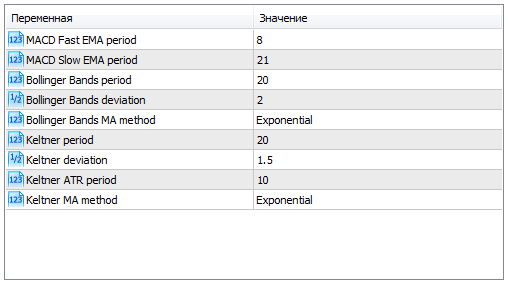
The MACD Fast EMA Period and MACD Slow EMA Period variables allow you to specify the fast and slow moving average periods for calculating the MACD indicator.
The Keltner Period and Keltner ATR Period variables allow you to change the channel calculation period itself, as well as the ATR volatility period.
The Bollinger Bands Period and Bollinger Bands Deviation variables allow you to change the Bollinger Bands calculation period, as well as the deviation from the mean for plotting the bands.
Finally, it's worth noting that MACD Squeeze is an interesting modification of the standard MACD. It allows you to filter out a large number of false signals by incorporating two channel tools.
Download the MACD Squeeze indicator.

