Fibonacci Levels Indicator - Trade Channel
The mathematical approach to market analysis is one of the most common, as any strategy is based on statistical data analysis, as well as a proper formula for capital and risk allocation. 
However, behind the dry mathematical calculations, one can often encounter the use of so-called magic numbers, often referred to as Fibonacci numbers.
This rather intriguing relationship between the proportions of various bodies in living and inanimate nature, which has been repeated repeatedly and has the same numbers, has captivated the minds of many mathematicians.
Naturally, this mysticism has not bypassed the forex market, as such percentage ratios have become used to analyze crowd behavior and, most importantly, to determine the degree of market correction.
All these tools require traders to apply them to the chart themselves. As a result, many beginners not only have little understanding of these tools, but also use them completely incorrectly.
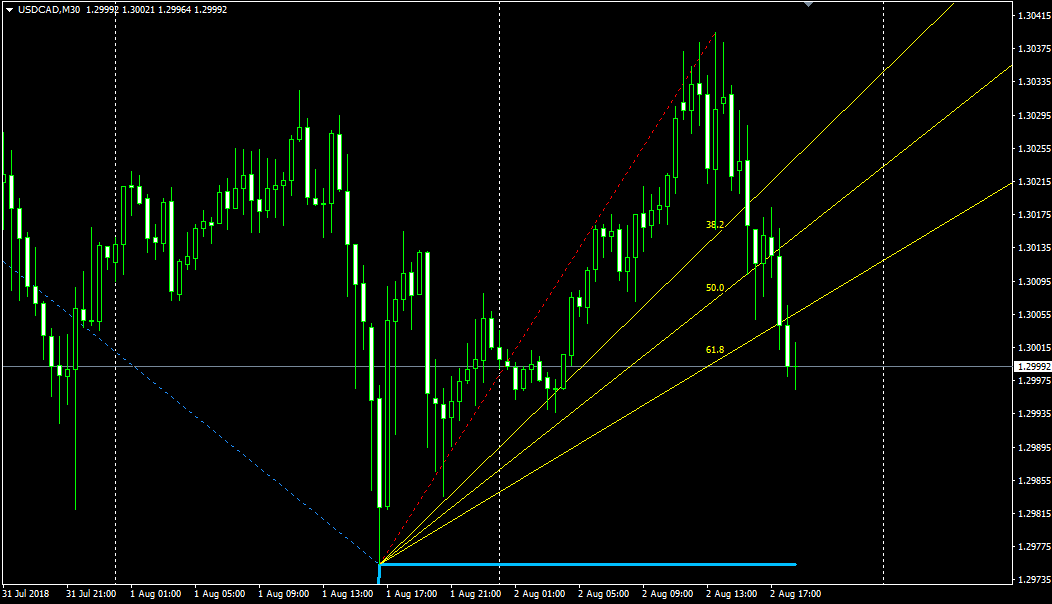
Trade Channel is a Fibonacci levels indicator that automatically plots a trending tool called the Fibonacci Vertex on the chart, as well as a global price channel, allowing you to visually track how the price moves within a range.
This Fibonacci level indicator is practically the only working version of the Fibonacci fan. The tool's unique feature is its ability to plot two fans simultaneously, allowing for analysis of the depth of retracements for both global price movements and microtrends.
The tool itself is a companion tool, so it can be used on any currency pair or timeframe. This indicator will be especially useful for all practicing traders who want to automate and facilitate their Fibonacci level trading.
Installing Trade Channel
Trade Channel is a custom assistant indicator. Therefore, it is not included in the official MT4 library. To use it, you will need to follow the standard procedure for installing technical indicators through the data directory.
First, navigate to the very bottom of this page and download the Trade Channel indicator file. Next, you will need to access the terminal's data directory, which you can launch in your MT4 trading terminal using the File menu.
When you open the data directory and a list of system folders appears, find the one named "Indicators." Open it and paste the previously downloaded Trade Channel Fibonacci levels indicator.
After installation, it is very important to either refresh the terminal in the "Navigator" panel, where the list of custom indicators is located, or completely restart the platform.
Otherwise, this script will not appear in the list. To start using the indicator, drag its name onto the asset of your choice. You will see the following:
Application in Forex trading
As we've already noted, Trade Channel can safely be called an assistant, as it automatically applies the Fibonacci Fan to the chart.
This construction consists of three rays labeled 38.2; 50; and 61.8. In fact, each of the rays is the strongest support level for the trend, and the labels indicate the percentage of the main trend that has retracement.
It's important to know that 61.8 is considered the strongest level, since breaking it indicates the retracement has transformed into an independent new trend.
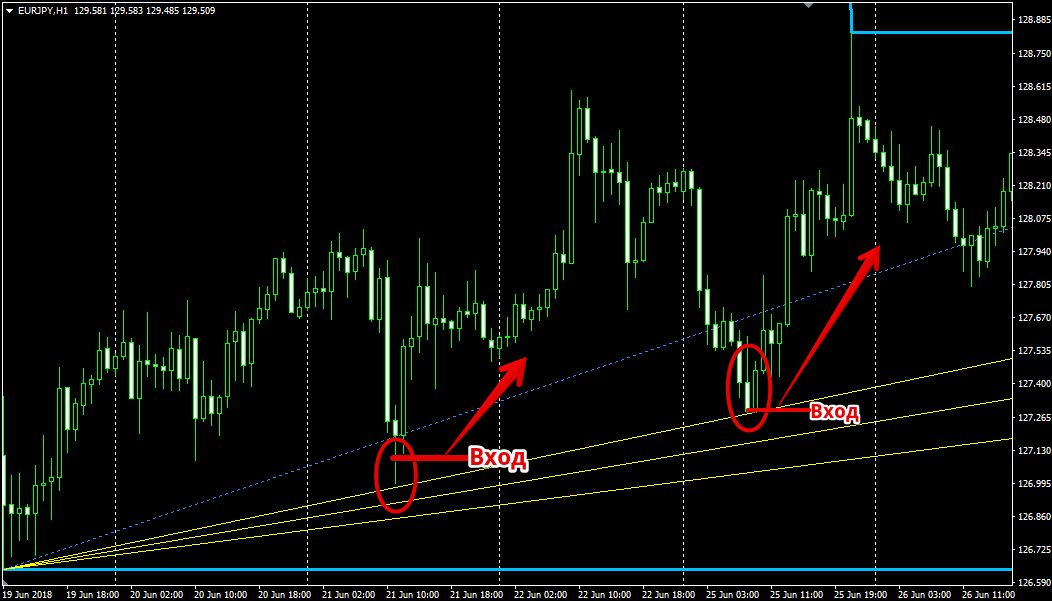
The Fibonacci Fan is an excellent tool for trading after a correction in the direction of the global trend. Therefore, if the price declines on an ascending fan and touches one of the rays, especially 50 or 61.8, it's necessary to open a buy position.
If, on a descending fan, the price rises and touches 50 or 61.8, it's necessary to open a sell position in the direction of the trend continuation. A simple example of trading in the direction of the trend:
Besides trading pullbacks, traders can also use fan patterns to detect trend changes and generate signals for a new trend.
As we've already noted, the key level that indicates a trend change is 61.8. So, if an ascending fan pattern breaks through 61.8 from top to bottom, open a sell position.
If a descending fan pattern breaks through 61.8 from bottom to top, open a buy position. It's also important to wait for confirmation of the breakout, when the price, after a strong surge, retraces to the line and continues moving in the direction of the new trend. Here's a quick example:
Trade Channel is one of the few indicators that can automatically plot a Fibonacci fan on a chart.
However, it's important to remember that this tool is primarily an aid, so it's important to carefully study its constructions and monitor its performance.
Download Trade Channel
Here are some more useful materials on the topic:
Fibonacci Strategy - http://time-forex.com/strategy/st-fibonashi
Advisor for automated trading on Fibo - http://time-forex.com/sovetniki/fibo-martin

