WolfWavesFind indicator
It's no secret that the market has a wave structure. One of the first traders to discuss this more than twenty years ago was Charles Dow.
Now that there is no need to draw graphs manually, as was previously the case, everyone can see this for themselves.
Any growth is sooner or later followed by a decline, and while the wave sizes may vary in both the number of candles and the dynamics of their occurrence, the overall structure of the trend is practically identical in all markets.
It was this pattern that Ralph Elliott first noted when he created his own wave theory of five trend waves and three correction waves.
This theory has found millions of followers around the world, but as practice has shown, everything is far from ideal as described in books.
It is worth noting that, despite the effectiveness of the Wolfe wave theory, it is very difficult for beginners to apply it in practice, since the subjective factor of market perception is of great importance when marking it.
This is why many people use auxiliary technical indicators to find patterns, and in this article we will get acquainted with one of them.
The WolfWavesFind indicator is a technical analysis tool that allows you to find and visually outline Wolfe waves, and unlike other similar tools, it also uses divergence to confirm a reversal.
The Wolfe Pattern is found and effectively applied to all currency pairs and trading instruments where a trend is present, so you can use the indicator on absolutely any trading asset.
It's worth noting that the wave theory is more effective on higher time frames due to the lack of unnecessary market noise; however, the indicator is applicable to absolutely all time frames.
Installing the WolfWavesFind indicator
The WolfWavesFind indicator is a custom technical analysis tool, so to use it in practice, you will need to download the indicator files at the end of the article and then install them directly into the MT4 trading terminal.
WolfWavesFind installation follows the standard procedure, namely, you will need to copy the downloaded advisor files to the appropriate folder in the terminal data directory.
To access the terminal data directory, launch your MT4 trading terminal and go to the file menu in the upper left corner.
Then, the next step is to find the line called “Open Data Directory” in the list of options and run it.
After launching the data directory, a list of the platform's system folders will be displayed on your monitor screen. Among these, find a folder called Indicators and drop the previously downloaded WolfWavesFind indicator files into it.
In order for the terminal to see the indicator you installed, you should update it in the navigator panel or restart it.
After restarting the platform, WolfWavesFind will appear in the list of custom indicators, and to apply the tool, simply drag its name onto the chart.
Practical Application of the WolfWavesFind Indicator
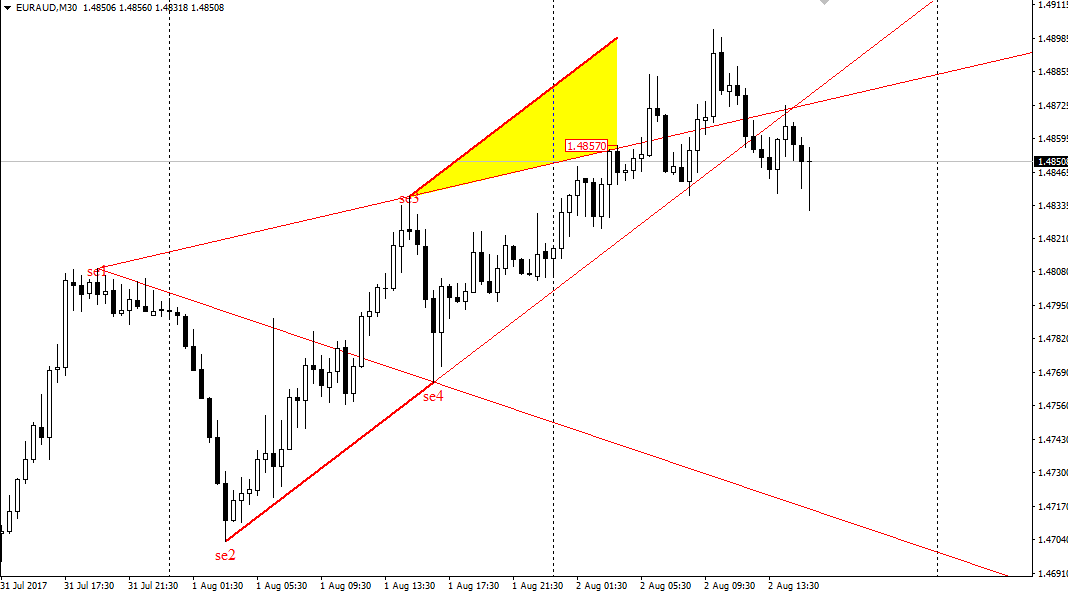
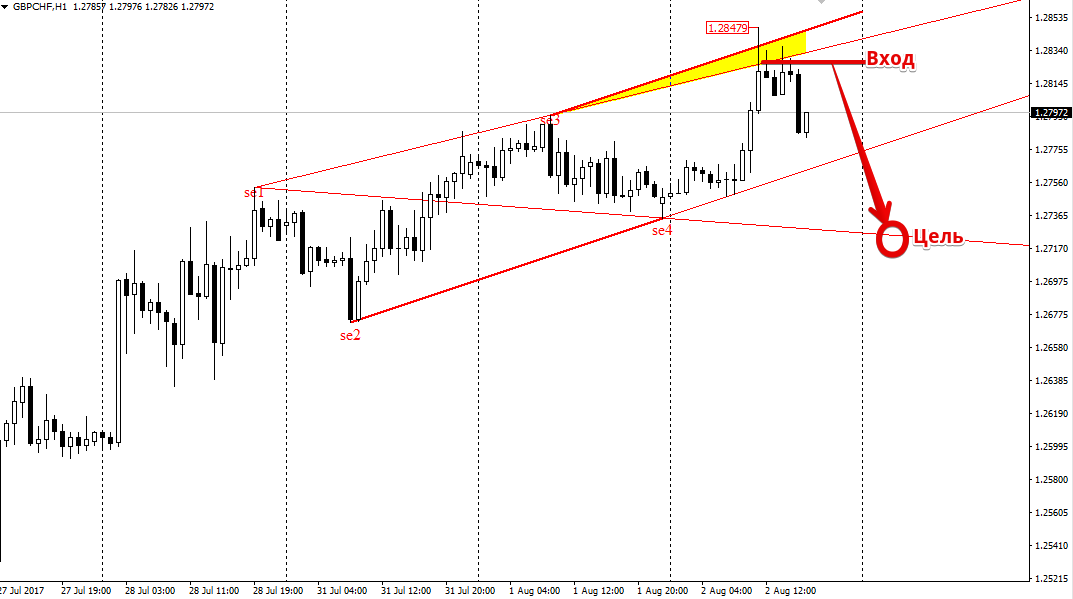
The Wolfe pattern consists of five waves, with only the last one being traded in practice. It's worth noting that the fifth point, from which a trend reversal is highly likely, is colored yellow by the WolfWavesFind indicator, and in practice, this is called the sweet spot. The pattern appears in both bullish and bearish trends.
So, if the indicator detects a Wolfe pattern on an uptrend and the price enters the shaded yellow area, we open a sell position.
If the indicator detects a Wolfe pattern during a downtrend and the price enters the yellow-shaded area, open a buy position.
It's worth noting that the target for both purchases and sales is the line drawn by the WolfWavesFind indicator through points 1 and 4. Example:
WolfWavesFind indicator settings
By adjusting the indicator's settings, you can directly influence the accuracy of the Wolfe pattern's detection, as well as modify the indicator's graphical components to suit your needs.
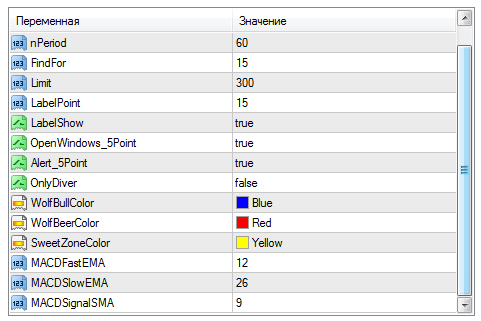
Using the FindFor and nPeriod variables, you can set the minimum and maximum number of candles required to form an extreme value when a Wolfe pattern is detected. The Limit variable controls the number of candles in history used to search for the pattern.
The OnlyDiver variable allows the trader to turn on an audio message if a confirming divergence is formed on the Wolfe pattern MACD indicator.
In this case, you can change the fast, slow and signal lines of the Macd indicator in the variables MACDFastEMA, MACDSlowEMA, MACDSignalSMA.
In conclusion, it's worth noting that the patterns detected by the WolfWavesFind indicator are far from perfect. However, this tool allows one to quickly grasp Wolfe's theory in practice and makes life easier for novice traders in finding this pattern.
Download WolfWavesFind.

