LowRiskScalper Advisor: The Holy Grail of Forex or Just Another Paid-for Scam?
The widespread popularity of the Forex market among the general public, as well as the overwhelming desire to make money in this field, has given rise to a new phenomenon: the emergence of sellers of profitable advisors.
In fact, the emergence of paid algorithms is not surprising, since a completely market law applies: if there is demand, then supply will inevitably appear.
Naturally, with the rapid popularity of robotic trading, hundreds of sellers have emerged who are willing to sell their brainchild for a couple of hundred, or even thousands of dollars.
The most interesting thing is that there is practically no difference between cost and efficiency correlations, and the buyer, as a rule, buys a pig in a poke.
It's also becoming increasingly common to see paid advisors being given away for registering via an affiliate link, attracting increasing user attention.
At the end of this article, you'll find only a demo version of the expert advisor, but further testing will tell you whether this development is worthwhile.
Installing the LowRiskScalper Advisor
To install the advisor, scroll to the end of the article and download it. Next, you'll need to access the trading terminal's system folders. To do this, go to the trading platform's File menu and open the "Data Catalog.".
A list of system folders should appear in front of you, among which you will need to find a folder called expert and drop the downloaded LowRiskScalper advisor into it.
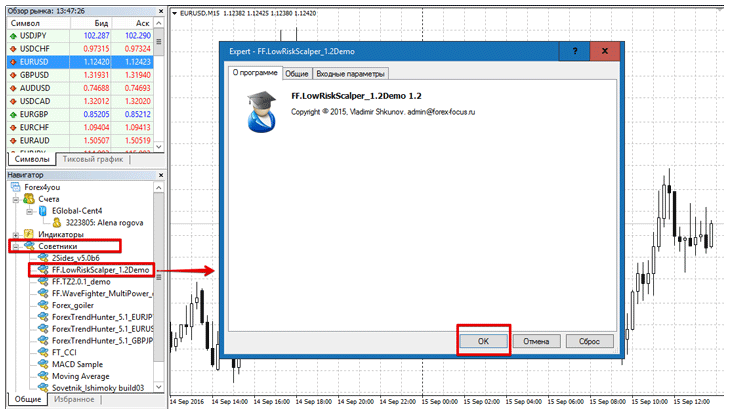
Next, close all system folders and refresh the terminal in the navigator panel. After you restart the trading terminal or refresh, the Expert Advisor should appear in the "Expert Advisor" section. To start trading, simply drag it onto the 15-minute EUR/USD chart.
LowRiskScalper Strategy and Settings
The developer of the advisor mentioned practically nothing about the robot's strategy. The only thing the author himself included in the description of the development is that the advisor opens trades based on an indicator strategy, as well as an analysis of the previous bar.
This strategy doesn't redraw signals, allowing for testing using the "Checkpoint" method. This approach significantly speeds up the testing and optimization process for the Expert Advisor.
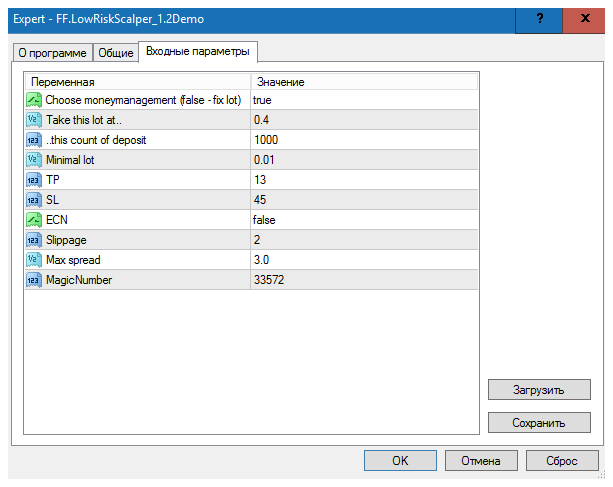
If you look at the settings, you'll notice that the author hasn't added anything that could affect the advisor's strategy. For example, in the "Choose money management" line, you can choose automatic (dynamic) lot calculation) or static.
If you prefer a static lot, select False in this line, and if you prefer a dynamic lot, leave it as is. Dynamic lot calculation uses a simple ratio of 0.4 lots for every 10,000 deposited. To change this ratio, enter the lot size in the "Take this lot at" line and the deposit amount in the "This count of deposit" line.
The Min Lot line allows you to set the minimum lot, which the advisor should work with (this function allows trading on a micro account despite the MM being enabled). In the TP and SL lines, you can change the stop loss and profit size. It's worth noting that the profit is three times smaller than the stop loss, which is good.
Preliminary test
Since the advisor was developed for the EUR/USD currency pair, we decided to conduct a test using checkpoints for the entire 2015 period on a 15-minute chart. For objectivity, the settings were left unchanged, and the results can be seen below:
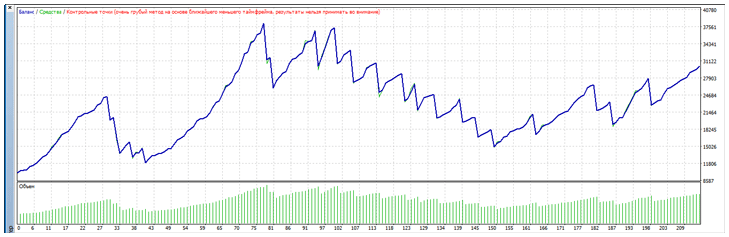
As you can see from the results above, the EA secured over 200 percent profit, which is an excellent result for any scalper. However, it's worth noting that the EA clearly only performs well in one market condition—either trending or flat—as reflected by the change in the yield curve.
In conclusion, I'd like to point out that the expert's price is clearly plucked from thin air, and by purchasing it, you'll be buying a pig in a poke, as you won't be familiar with the expert's strategy and won't be able to influence its performance by changing its settings.
In addition, it is not recommended to use the advisor without a preliminary test cent accounts, the risk of losing your deposit is quite high.
Download the LowRiskScalper Advisor

