The best channel indicator, comparison, review and basic settings
Price, as trivial as it may sound, follows certain patterns in its movement.
It's no secret that the wave theory, like many others, is based on observations, but one of the most fundamental patterns is the channel-like movement of the price.
You might ask, how does this pattern manifest itself? I think it's no secret that the price almost never moves exclusively up or down.
No matter which chart you open, you'll always see various pullbacks and undulating graphs. This is because, according to many theories, the price always seeks equilibrium after strong fluctuations in different directions.
It is during these fluctuations that the channels that are so often used in technical analysis are formed.
To simplify the construction process and apply specialized mathematical approaches, traders use so-called channel indicators, which perform automatic construction. There are various approaches to construction, ranging from complex mathematical approaches to simple methods based on a few reference points.
The most popular channel indicators
In this article, you'll learn about the most popular channel indicators, as well as download and apply them to your own trading.
SHI Channel.
The SHI Channel indicator automatically builds the so-called Borishpolts channel.
This tool is based on the Bill Williams fractal, which consists of five candlesticks: one central main candlestick and two side candlesticks.
To construct the channel, the indicator captures the last two fractals and plots a line based on them. Then, after capturing the opposite third fractal, a second equidistant line is constructed.
Two classic trading techniques are used: trading on a rebound from the channel boundaries with a minimum target to the midline, or a breakout of the existing boundaries. Upon a breakout, the tool marks the breakout, symbolizing a signal on the chart.
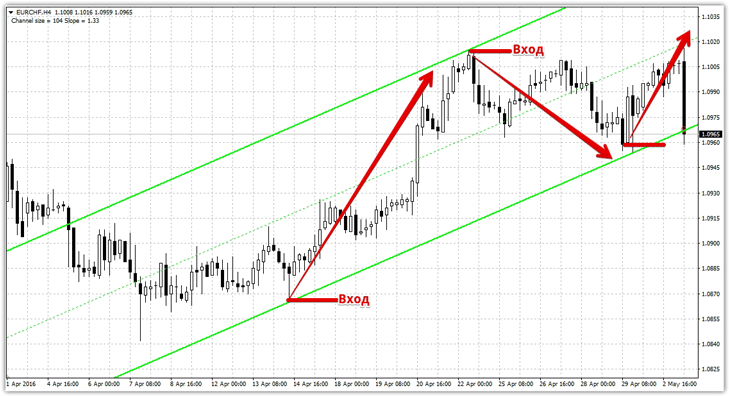
In the indicator settings, you can change the fractal size used for calculations in the BarsForFrac line. As everyone knows, a fractal consists of five candles, so specifying a parameter greater than five will yield stronger points, but with a significantly delayed effect.
The ALLBARS line specifies the number of candles on which the channel will be built.
Keltner Channel
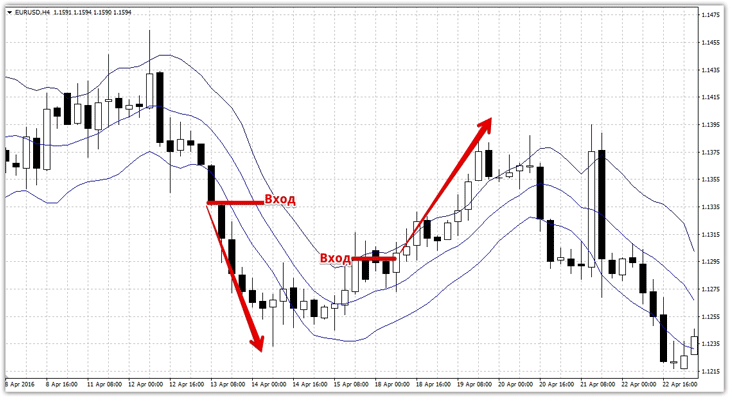
. The Keltner Channel indicator is one of the most popular technical analysis tools, displaying a kind of channel around the price, consisting of three lines. Unlike the previous tool, the indicator is based not on pivot points, but on a mathematical approach using a moving average.
You can change the moving average period in the settings. The Keltner Channel is 90 percent similar to Bollinger Bands and is fundamentally based on volatility parameters. When using the Keltner Channel, it's important to understand that when scalping on small time frames, it's common to consider signals of rebounds from price boundaries, while when trend trading on longer charts, signals of channel breakouts are taken into account.
Donchian Channel.
The Donchian Channel indicator was developed back in the 1970s by Richard Donchian. The principle of its construction and application is quite simple. The indicator finds price highs and lows over a specified period of candlesticks, 20 by default.
By plotting these values as a channel, interpreting signals boils down to breaking out of these extreme values and setting new targets. The tool was developed for trend trading on larger time frames, preferably on daily charts.
When using the script for scalping, it's best to consider signals triggered by a rebound from price boundaries, while when trading for trend continuation, consider signals triggered by a breakout of one of the boundaries.
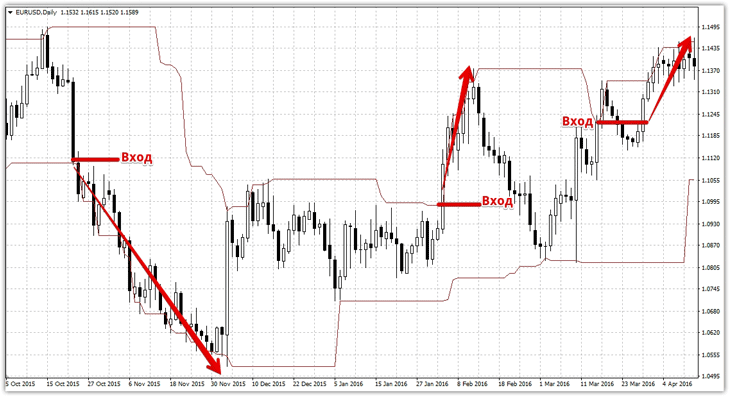
The indicator settings include only one period, which represents the number of business days in a month. This parameter is only relevant for trading on the daily chart, so before using the indicator on other timeframes, we recommend reconfiguring the tool.
LinRegression Breakout.
The LinRegression Breakout tool not only automatically identifies a channel from two lines but also provides signals when its boundaries are broken. Thanks to simple signals in the form of an up or down arrow, LinRegression Breakout is an intriguing tool for any beginner.
When one of the boundaries is crossed, the indicator's arrow indicates the direction of the trade, a cross indicates the stop-loss order, and a horizontal arrow indicates your profit.
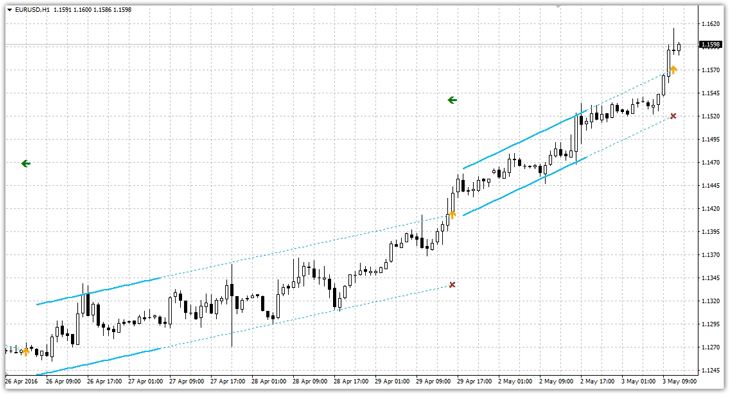
In the settings, you can change the minimum length and maximum width of the regression channel in candlesticks, set the number of bars for calculation, and specify a multiplier for calculating your profit.
In conclusion, I'd like to note that the variety of channel indicators that can automatically generate channels is enormous, and all of them have a right to exist.
It's important to understand that no single script can fully reflect the market situation, so for successful trading, channel indicators should be used in conjunction with other Forex indicators.
Download channel indicators.

