ArgoGuardian Assistant Advisor
The most common trader affliction, which causes dozens or even hundreds of accounts to be wiped out, is a lack of  discipline in capital management.
It should be noted that, regardless of whether a trader uses an advisor or trades personally, the error of taking profits and losses in a timely manner is common to everyone.
I would like to separately touch upon advisors, which in most cases use highly risky capital management models such as martingale or averaging, which lead to the immediate loss of all funds.
Traders who have ever encountered such robots know that in the event of a significant drawdown, they must make a tough decision and lock in the loss to avoid losing all their money. However, the simple hope that opening the next order with an inflated lot will lead to the expected resolution of the force majeure situation actually ends up worsening it.
Advisor Assistant Zero1.0
We've all heard many times that there are not only advisors that work  independently, but also various assistants that can greatly simplify the work of manual trading.
Of course, automated trading experts will always be indispensable, since full automation of the trading process completely eliminates the human factor.
However, studying the stories of successful traders, you realize that it is precisely human qualities that allow them to rise to the top, because emotions can have a detrimental effect on an account, and, conversely, create precedents that are later described in various books.
However, despite all the advantages of manual trading, many processes become beyond human control.
Clear script
A trader's efficiency directly depends on the functionality of the trading  platform through which the trading process is conducted.
While a wealth of different tools like indicators and the like are certainly important, the program's performance remains equally important, and unfortunately, it rapidly declines with prolonged use.
Many traders constantly view their broker as an enemy, blaming them for their interference when the platform starts to slow down.
Such complaints become especially relevant if order execution speed is very important for your trading strategy, for example, if you use a scalping or pipsing strategy.
Total Position Indicator
Surely, each of you has dreamed of peering beyond the market, seeing where traders stand, and 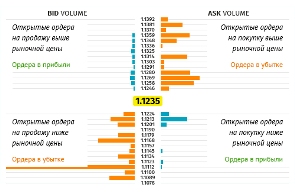 which direction the majority of players are aiming. Indeed, if you could master such valuable information, you would always be able to analyze the crowd's logic, their behavior, and predict potential price movements in the short term.
Broker Amarkets is the first to provide such information for general review to its clients.
Of course, you won't be able to get information about the order values of all traders, because even the broker doesn't know this, but you can always see which way Amarkets clients are trading and draw conclusions based on the information received.
TrailinRobot – a trader's indispensable assistant!
Sometimes routine tasks can be incredibly time-consuming. Setting a trailing stop and trying  to move it as closely as possible to follow the trend is one of them.
I'd never previously thought about trailing stops or their importance in trading, much less used them very rarely. However, I encountered a situation where I had about ten open orders, which at the time formed a well-structured pyramid.
In order to squeeze the maximum out of the market, I needed to move the stop order beyond the price of each order, and this needed to be done at a precisely specified distance so that the outer orders of the grid were 100% brought to a breakeven point.
Script "Profit Statistics".
Traders often require statistical information on their profits for various purposes, both to present 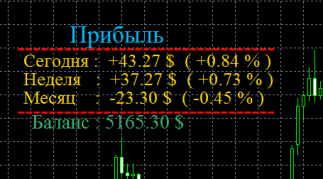 to investors and for their own purposes.
The "Profit Statistics" script displays relative and actual profits for the current day, week, and month.
As a result, you receive data on trade profitability in dollars and as a percentage of the deposit amount.
This is essentially the only feature of this tool that requires no additional configuration; installation is simply a matter of copying the script into the folder with the same name.
Take profit for pending orders.
Another assistant to simplify a trader's life, designed for those who use a large number of pending orders.
It allows you to automatically set take profits for them based on the stop loss and spread size.
Script highs and lows.
This indicator, which represents the minimum and maximum price for a given time period, is the primary benchmark when planning Forex trades. It allows you to not only determine the current price position but also forecast its future movement.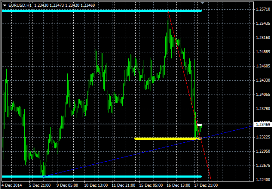
The "Minimum and Maximum" script plots sequential lines connecting the maximum and minimum price values for the day, week, and month.
This means you get not just levels, but graphic figures that characterize the trend and help assess the market situation.
"Indicators" folder and added to the chart using the standard scheme; only the color settings can be changed.
The script is breakeven.
Typically, setting a stop loss means closing a position at a loss, but why lose money if the price has entered the breakeven zone? You can move the stop to a more advantageous place.
The breakeven script allows you to close a trade with a zero result. This means that after the price moves a specified number of points toward profit, a stop order will be placed at zero, which will be triggered in the event of a reversal.
Order history script.
This tool allows you to quickly remove all graphic symbols (arrows) from your trading terminal charts and set new position entry markers.
This means your entire trade history will be visually represented using multicolored arrows, and hovering over an arrow will display a tooltip detailing the open position.
Script assistant.
An excellent tool that allows you to almost completely automate the process of placing orders, both market and pending, as 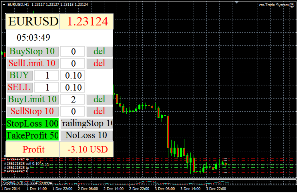 well as stop orders.
The order placement assistant script offers the most advanced functionality, meaning that once you launch the program, you can forget about the standard method of opening new positions and enjoy a comfortable experience.
It's no wonder the author positions this script as an expert advisor, although it doesn't perform any independent trading.
The assistant is installed in the "Experts" folder by simply copying the file from the archive to the specified directory. Then, restart the trader's terminal and add the script to the desired chart.
Script for setting up an order ladder.
There are many interesting tactical approaches to order placement. One such approach is creating a profit ladder, whereby multiple orders are simultaneously opened with the same opening price, direction, and stop-loss size, but each one has a different take-profit.
For example, we place five buy orders, the first of which closes with a profit of 20 pips, the second with 30 pips, the third with 40 pips, and so on, with a safety stop-loss at all 30 pips.
Script - Stops on all orders.
Sometimes, for various reasons, you need to set stop-loss and take-profit levels on existing orders. This can be done individually for each order, or you can use a script.
The script that sets stop-loss levels for all existing positions works very simply: you set the desired size and field in MetaEditor, then click the script, and it will automatically set the stop-loss and take-profit levels.
Script spread size.
If you want to check how truthful your broker is when they claim to have the smallest spread, use this indicator. 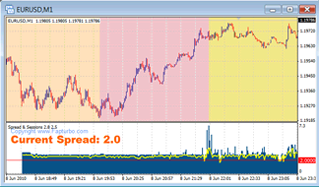 It will help you record the history of spread changes even when you're not at the trading terminal.
The spread size script performs only one function: it tracks changes in the broker's spread and displays them as a curve in a separate terminal window.
An additional bonus is the color-coded highlighting of forex sessions, allowing you to quickly identify when the broker's commission is lowest and when it's best to postpone trading.
Script for deleting pending orders.
Many Forex traders like to place a large number of pending orders that will trigger under certain conditions. However, as time passes and the conditions change, it becomes necessary to delete orders with outdated parameters.
A pending order deletion script easily handles this task; in its settings, you simply need to select which pending orders to delete.
Script for automatic order placement.
First of all, it's worth noting that this is a fully functional script for automatically setting buy and sell order parameters. It works with any DC and quotes, regardless of the number of decimal places (three, four, or five).
The account type also doesn't matter—demo, cent, standard, or ECN—the script works equally well on all of them.
So, what can this script do, and what are its settings?
Script "Download quotes".
A trader's trading terminal often requires the entire quote history. Downloading it individually for each currency pair is quite inconvenient. It's easier to do this using a special script for most trading instruments.
Setting stop orders with a mouse.
Setting stop-loss and take-profit orders has always been a top priority when trading Forex. If you're trading a single open position, it's easy to change its parameters as the market situation changes. However, if you have multiple orders open for a single currency pair, this process can take quite a while.
This script is perfect for simultaneously changing stop-loss parameters for multiple open positions.
A script that helps set a trailing stop.
A trailing stop is a type of stop order that automatically closes a position once the price reaches a certain level.
Unlike a stop loss, this order doesn't have a fixed value; it's floating, meaning it sets a distance from the current price in points, rather than a specific point at which the position will be closed.
Calculation of market volatility.
A convenient script that automatically calculates Forex volatilityand uses the resulting data to place stop-loss or take-profit orders, as well as for other purposes.
The program is quite simple and requires virtually no configuration. To calculate market volatility for a given period, simply follow these steps:
Script for risk and calculation of stop loss and take profit.
Risk management is a key aspect of forex trading; without it, a trader can quickly lose all their funds in their account. The key parameters a trader should know are the ratio of deposit size to forex trading lotsize, stop loss, and take profit.
A script for calculating these parameters has been developed to partially automate these calculations. Let's test how effectively this program works.
Page 3 of 4

